 Ananya Dixit · February 3, 2026 · 3 min read
Image Source: Microsoft
For more than 30 years, NTLM (New Technology LAN Manager) has been a core Windows authentication protocol. It helped companies to shift from legacy LAN Manager authentication to enterprise networking of the modern era.
But times have changed. Recently, Microsoft has announced its plan to disable NTLM by default in new Windows releases. This marked the end of a protocol that has shaped organizational authentication since its launch in 1993.
This move signals that legacy security models are no longer suitable in today’s zero-trust world. Here is a breakdown of why NTLM is retiring and why Kerberos replaced it.
Quick Recap of NTLM
New Technology LAN Manager (NTLM) was designed in the 90s when corporate networks were relatively small and constrained within the physical office boundaries. Moreover, being a challenge-response authentication protocol, NTLM uses a hashed version of a password, instead of sending it over the network.
NTLM was more suited to the environments where networks were local with no centralized domain controller, and when devices are used to operate in work groups, rather than domains.
However, NTLM was not designed specifically for hybrid networks, remote workforces, cloud-based environments, and modern threats. Despite these limitations in the protocol, it does not disappear entirely. It will serve as a fallback authentication method when Kerberos is unavailable.
Why is Microsoft Retiring NTLM?
Microsoft’s decision to disable the default system of NTLM is led by one critical reality: NTLM is fundamentally insecure by modern standards. Let’s list some of the reasons:
- NTLM uses weak cryptography, further depending on outdated hashing processes that are vulnerable to modern-day cracking techniques. By using tools like Hashcat, John the Ripper, and Rainbow Tables, hackers can easily get passwords from NTLM hashes.
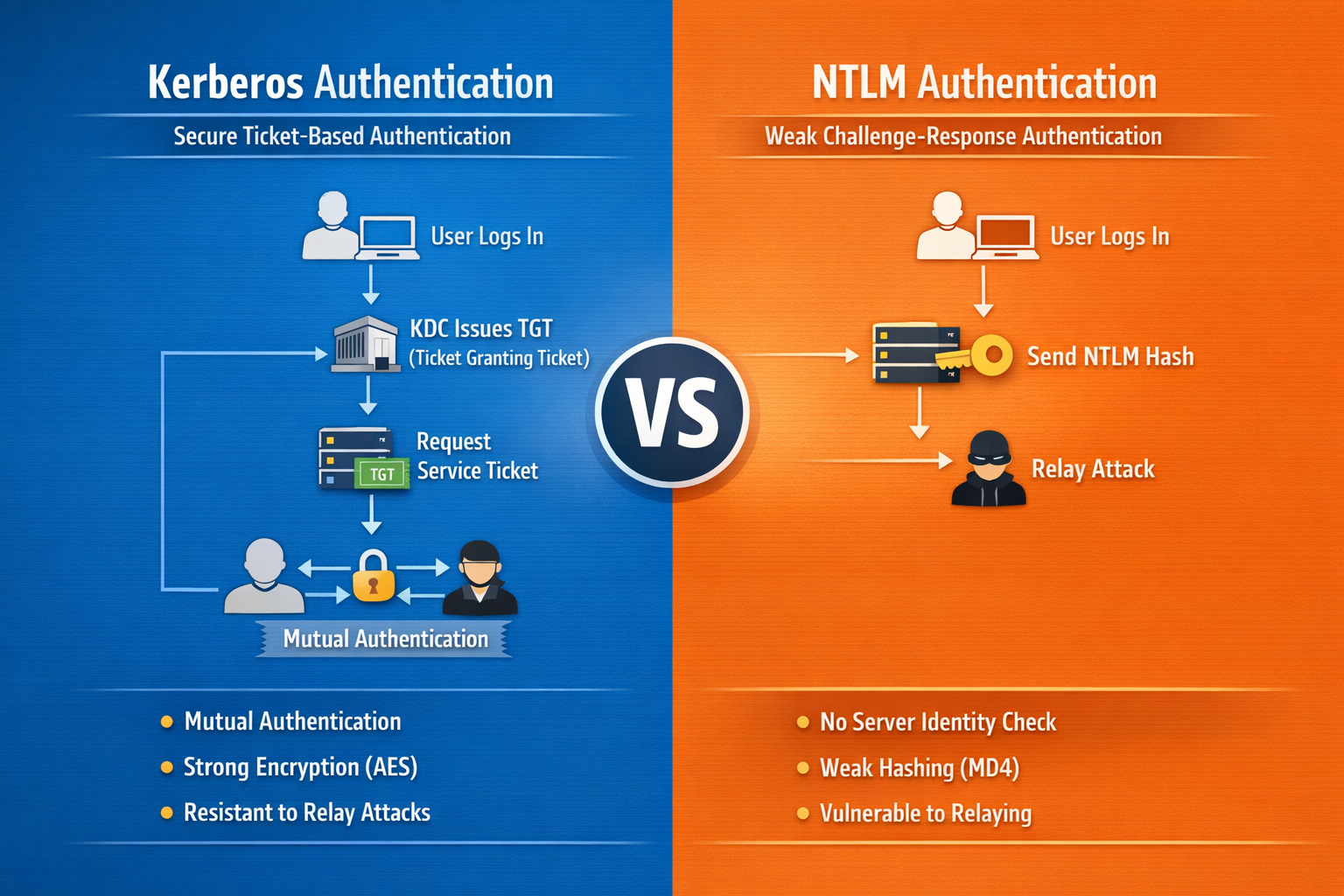
- This protocol is vulnerable to relay attacks. In a relay attack, attackers manipulate the users to authenticate to a malicious server. By catching authentication requests, attackers relay them to any other server for the purpose of gaining unauthorized access. On the contrary, Kerberos was specifically designed to prevent such exploitation.
- As NTLM was designed years ago, it does not support modern-day security models like Zero Trust Security, Cloud Identity Management, or multi-factor authentication (MFA).
Enter Kerberos
Unlike a password-hash exchange system used by NTLM, Kerberos is a ticket-based authentication system. It provides a security solution for organizations of all sizes. Starting with Windows 2000, it became a default authentication protocol for every domain-joined Windows device.
This protocol uses symmetric key cryptography along with a Key Distribution Center (KDC) to verify user identities. The KDC consists of a ticket-granting system (TGS), a Kerberos database storing passwords, and an authentication server.
While performing the initial authentication, the Kerberos protocol stores the particular ticket on the device of the end user. Rather than looking for a password, the service checks this ticket. Thus, the authentication process of Kerberos is performed in its own environment, wherein the KDC is authorized to verify a host, user, or service.
Why Kerberos?
One of the major advantages of using Kerberos is mutual authentication. Kerberos enables users and other service systems to verify each other. While performing all the steps, the server and users will be aware of the trustworthiness of their counterparts.
Additionally, every ticket comes with a timestamp and lifetime data, while admins control the time period of authentication. With a reusable authentication system, every user in the Kerberos protocol will be verified only once. After that, the user does not have to re-enter the personal details.
Related Posts

Ananya Dixit is a seasoned content writer and editor with over seven years of experience in tech, finance, and media. She has written extensively about Microsoft technologies, covering multiple versions of Windows—from Windows 7 and 10 to the latest Windows 11 releases. Her work includes in-depth troubleshooting guides, feature breakdowns, how-to tutorials, optimization tips, and coverage of new system updates.Ananya is also passionate about trending topics in the tech world, including AI tools as her personal favorite, digital privacy, productivity apps, and the newest features rolling out across Android and iOS. Read Ananya’s Full Bio

