 Aseem Kishore · September 16, 2009 · 2 min read
 In SQL 2005, you may come across a situation where you need to generate a ALTER TABLE script, such as when adding a new column to a database or changing the field type, etc.
If you want to generate a script for a particular SQL function, such as CREATE, SELECT, UPDATE, etc, you would normally just right-click on the table in SQL Management Studio and choose Script Table as and then the function you want to script.
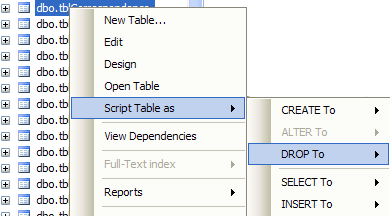
However, the ALTER To option is disabled in the Script Table as menu option! So if you want to generate a script, how do you go about doing it? Well, you can’t do it this way when you alter a table.
In order to generate the script, you first right-click on the table you want to alter and choose Design.

Now go ahead and add your new columns, change the field types, set your fields to accept NULLS or not, etc. Once you are done, you want to right-click on any column or in the white space and you’ll see the option Generate Change Script is now available.
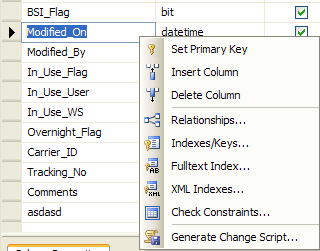
Now go ahead and save that file and you’ll have your ALTER TABLE script! It’s a bit confusing since all the other functions can be scripted just by right-clicking, but it’s simple once you learn it. Enjoy!
Related Posts
- How to Fix App Notifications in Windows?
- Using an Old Device? 5 Account Security Settings You Should Enable
- How to Find Features Moved from Control Panel to Settings in Windows 11?
- How to Back Up Your Android Downloads Automatically?
- Camera Not Working in Zoom or Teams? Quick Fixes for Windows and macOS

Founder of Help Desk Geek and managing editor. He began blogging in 2007 and quit his job in 2010 to blog full-time. He has over 15 years of industry experience in IT and holds several technical certifications. Read Aseem’s Full Bio

