Related Posts

16 Comments Already

commenter
simeleketek Said,
May 8th, 2009 @6:08 am  

very useful :D

commenter
JSJcbs Said,
July 1st, 2009 @6:57 pm  

Thanks, I just did a system reformat and IE was opening links in a new window instead of new tabs! Thanks for the help.

commenter
August 9th, 2009 @9:26 pm  

But I tried this in IE8. It does not work. It still opens in a new Window

commenter
TruEnuff Said,
October 10th, 2009 @11:55 am  

Thanks for this tip. I use IE 8 and this fix worked immediately. Being a frequent Firefox user, I find the ability to have a link open in a new tab to be very useful. IE 8’s insistance on stacking up windows every time a new link is clicked is really annoying. I still can’t figure out why they call opening a new link a “pop-up”, but I’m happy!

commenter
October 28th, 2009 @12:23 pm  

Thanks, I had no idea how to do this :)

commenter
Shelly Said,
November 3rd, 2009 @7:47 am  

My Internet Options menu does not have a “General” tab!

commenter
MaxthonUser Said,
November 28th, 2009 @5:50 am  

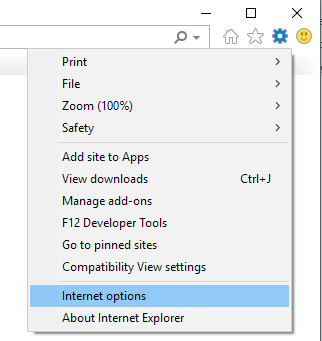
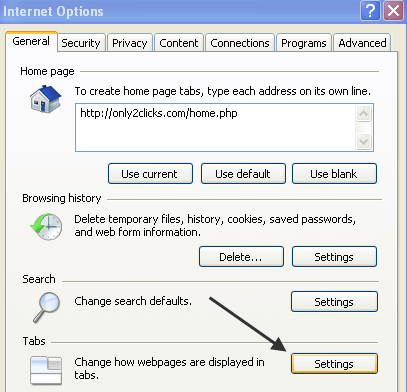
Am I missing something here? I’ve set the options as above, and some links open on new tabs, while some links use the same tabs (overriding the old tab).

For instance, just do a search on google for anything. Click on any results. The new page loads on the google search results page, overriding it.

This is so frustrating! Hopeless IE people – pack so much into the functionalities, and yet can’t do a simple thing like this properly.

commenter
Kfink44 Said,
December 4th, 2009 @4:18 pm  

My IE8 does the same thing Maxthon. I think it is because in the article it states, “Now when you click on a link in Internet Explorer that is set to open in a new window, it will instead open in a new tab!” So to me that means the link you click on has to be set in the Http code to open a new window when you click on it. But if the link is configured in the Httl code to open in the current window, then it will not go to a new tab. Someone correct me if I’m wrong.

commenter
bryanboova Said,
December 31st, 2009 @10:37 am  

Thanks for the help! This is the default behavior in Google Chrome and I wanted this in IE.

commenter
spk2629 Said,
February 9th, 2010 @10:58 pm  

Thanks a million – this was killing me when I had to use the computers on campus. I am a die-hard Firefox user but I have to use IE for some classes. No one else knew how to fix this irksome issue. My hat’s off to you!

commenter
Arcturus Said,
February 23rd, 2010 @5:08 am  

Thanks alot dude. This was driving me batshit nuts. I agree with you. What is the point of a tab enabled browser that opens links in a new window? As usual, it seems that developers still seem to think that they can tell their customers what it is that they want & can have from software rather than considering what it is that people will actually find useful.

commenter
ekeko Said,
February 24th, 2010 @11:45 am  

Thanks a bunch! My customers were wondering how to get IE to behave this way.

commenter
Lorri Said,
April 21st, 2010 @12:16 am  

Mine still opens in a new window, and not a new tab. I have done all of the suggestions above and am about ready to pull my hair out. :(

commenter
KenD Said,
April 29th, 2010 @9:48 am  

I’m with Lorri….IE8 simply will not open clicked links in a new tab rather than a new window, even after reinstalling. Maxthon which I believe sits on top of IE, works fine. Firefox, of course, has no problems with this concept. Any updated ideas?
Thanks.

commenter
RangeRover Said,
May 27th, 2010 @7:43 pm  

I actually knew very well that the tabs setting was in Internet Options and I am sure I would have figured out what to tick as there were only like 3 boxes not ticked by default..
Sadly, when I really needed to change that and stop the resource hogging Windows from multiplying across my monitor like digital bunnies, I plum forgot!

I am so grateful that peopletake the time to make clear and easy to follow directions and post them online.
I can’t even begin to imagine what a spiraling technicalnightmare running a computer and spending your time using all the Internet technologies if the Internet didn’t come with a pluthera of free help on how to deal with the littlep ickles all of us find ourselves in, either once in a while,or several times a day.

For the past and the unavoidable future…. Thank You! ;-)

commenter
Catherina Said,
June 10th, 2010 @8:09 pm  

Thanks! I switched back to IE after Chrome and the new window pop up instead of new tab was driving me nuts!

Please Leave Your Comments Below

Please Note: All comments will be moderated