
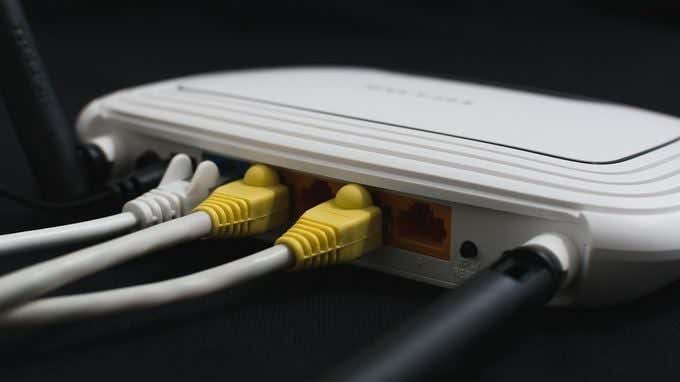
It’s hard to imagine that just two decades ago, only about one percent of the world’s population was online. Today, more than 4.3 billion people are actively using the internet, which is more than half of the global population. That’s how important having an internet connection is.
A few things can be quite frustrating as not having internet access though. On the one hand, you can connect to your wireless router, but on the other, you get the dreaded No Internet Access yellow triangle over the internet connection icon.
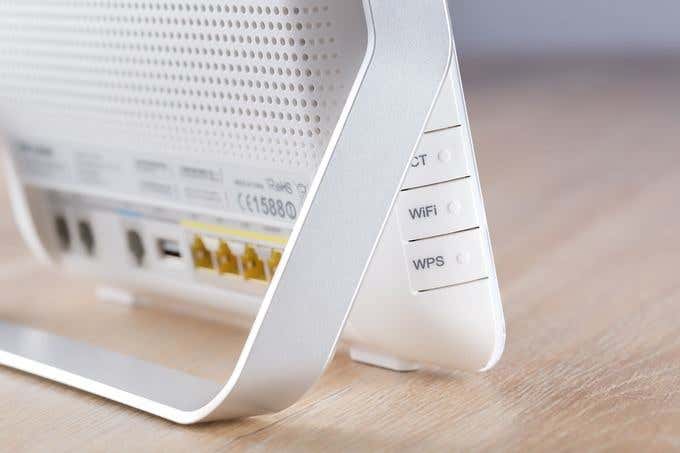
While it’s not easy to immediately detect whether the problem is with your router, computer, or your Internet Service Provider (ISP), you can fix this error and get back online. We’re going to show you how in this guide.
Also, we made a quick YouTube video on some of the steps that we have below so check it out first and if it doesn’t solve your problem, come back here for more solutions.
How To Fix No Internet Connection Errors
- Rule out false alarms.
- Check router lights.
- Restart modem and router.
- Run Windows Network Troubleshooter.
- Check IP address.
- Check network card.
- Check MAC Address filtering.
- Reset TCP/IP.
- Flush DNS.
- Disable security software.
- Update wireless drivers and network adapter driver.
- Upgrade router firmware.
- Reset your router.
- Reset your network.
Reasons For No Internet Connection
The main culprits involved with any networking issues are your device (computer, tablet, or smartphone) and wireless router.
Router-side issues could be anything from outdated hardware to buggy firmware or old infrastructure, damaged cables, spotty signal strength, and too many people connected at the same time to the network. Even though it’s rare, it’s also a good idea to check to make sure there is no malware on your router.
If there’s a problem with any of these devices, then you’ll see errors like connected but no internet or no internet connection messages.
What follows are some steps to take if you’re experiencing this common problem. We’ll tackle the simpler troubleshooting steps first, and move up to more advanced solutions.
Rule Out False Alarms
Before you try to fix your router or hardware, rule out any false alarms by doing the following:
- Check that your network hardware is switched on and plugged in.
- Visit several websites as sometimes the one you’re visiting could be temporarily offline so you end up assuming your connection is faulty.
- Confirm whether your other devices can connect properly. If it’s only your computer or your mobile device, it could be a misconfigured setting on that particular device. If there’s no internet connection on all devices, the problem could be your network equipment.
- Switch to a wired connection if available or try a different connection. If you can get online using any of these setups, your router is likely faulty or there’s a problem with the connection between your ISP and your home or office, or the ISP’s connection.
- Restart your computer to clear up temporary software glitches and try connecting again.
- Check whether your WiFi is turned on or enabled on your device. Most laptops have a WiFi button or switch which, if turned off, could result in no internet access.
- Disable Airplane mode if it’s on. You can do this using the Airplane mode button on your laptop, or from the Action Center for a Windows PC.
- Verify that you’re using the right SSID (router name) and security key. Re-enter the wireless password and try to connect again. It’s possible that you may have changed it and are using the old password.
- Reposition your router or computer. This helps maintain a strong signal between the two devices and prevents connectivity issues. You can also get a range extender to help get strong signals every time.
- Contact your ISP if your account is blocked. This can happen if you violate the Terms of Service, exceed bandwidth limits, or fail to update/pay your subscription fees.
Check Router Lights
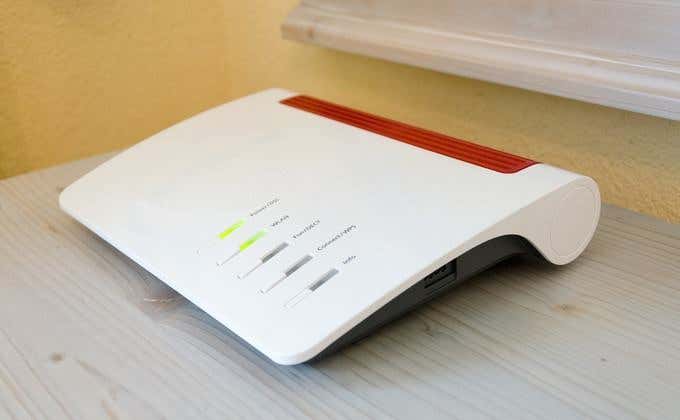
Your router has different status lights displayed on the front, with different labels depending on the model you have. These include the wireless light, Ethernet light (for wired networks), send/receive lights (blink rapidly) and the Ready/Service/Connect lights.
Check whether the Ready/Service/Connect lights are solid, which indicates a good connection. If it’s out or blinking, there’s a problem with the connection. But if it’s still solid and there’s no internet connection, check with your ISP if there’s an outage.
Restart Modem & Router
To do this, pull the power plug from your modem and router and let them stay unplugged for about two or so minutes.
Next, plug in the modem, let it boot up, and then plug in the router. Wait a few minutes for both devices to start up again and confirm they’re working correctly. This helps reset any background issues and flushes the router’s memory contents.
If there are no lights on any of them, it’s likely a hardware issue. If you still have no internet connection after restarting the modem and router, try the next step.
Run Windows Network Troubleshooter
If your connection problem affects multiple devices, this step won’t be necessary. However, if it’s only with your Windows computer, there could be an issue with the network settings.
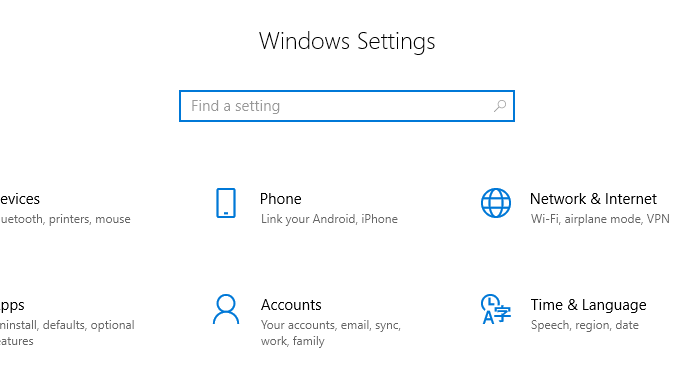
- Open Settings>Network & Internet.
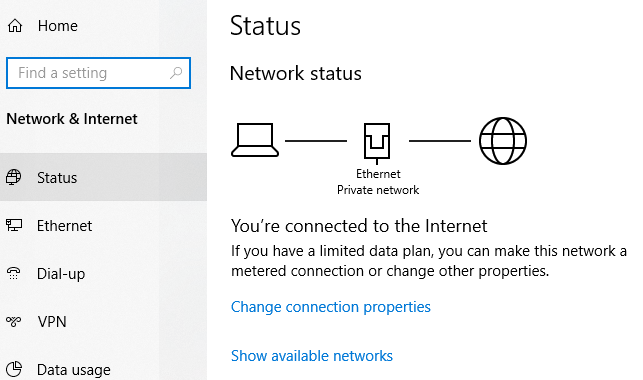
- Click Status.
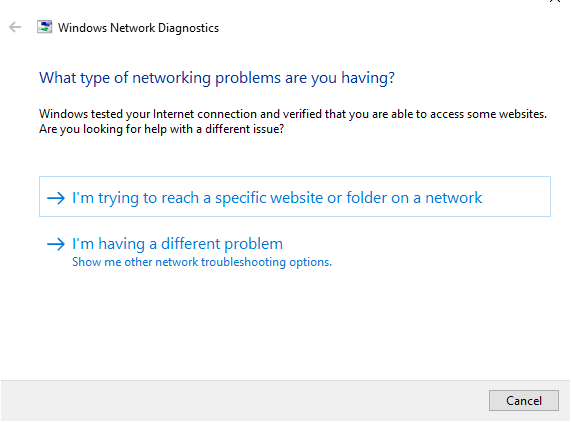
- Select Network Troubleshooter and follow the steps to diagnose and rectify the issue. It may not fix everything, but it’ll address most network-related problems.
Check IP Address
It’s possible to connect to your wireless router and still have no internet connection.
This happens when there’s an issue with the router’s connection to your ISP, so it’ll work on the network but won’t have a valid public IP address as it can’t reach the internet. Consequently, you can’t send or request data over the internet.
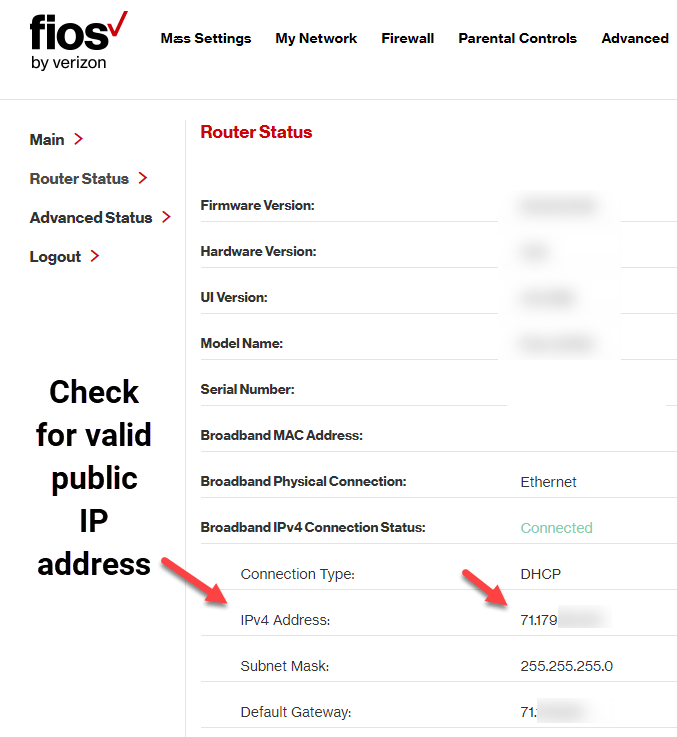
- Log into your router and go to Settings > Status (or Network Status) to check if the IP address is valid. If the status says Off or Disabled, and there are not numbers for the IP address, the router isn’t getting an IP address from your ISP.
- You can request a new IP address by using the Renew (or similar) button. If this doesn’t work, call your ISP for further guidance as the issue could be from their end.
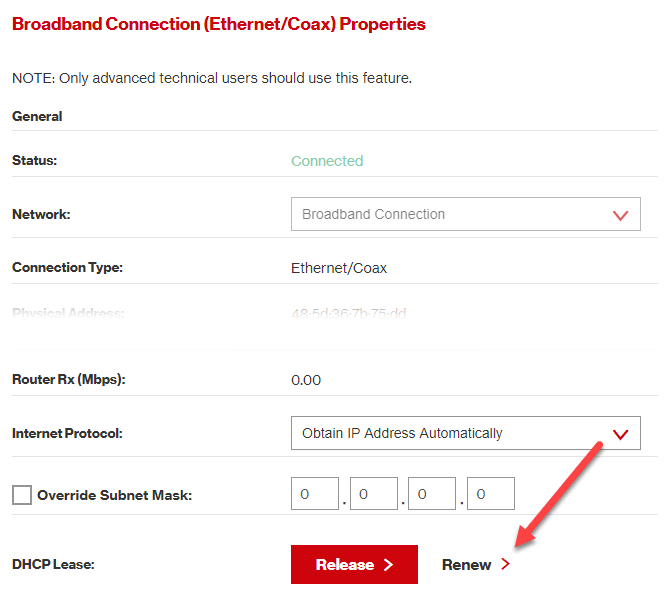
Another way of changing your IP address is by obtaining one automatically. This helps when your device is set up to use a static IP address but the router won’t allow it on the network or the address is for the wrong network.
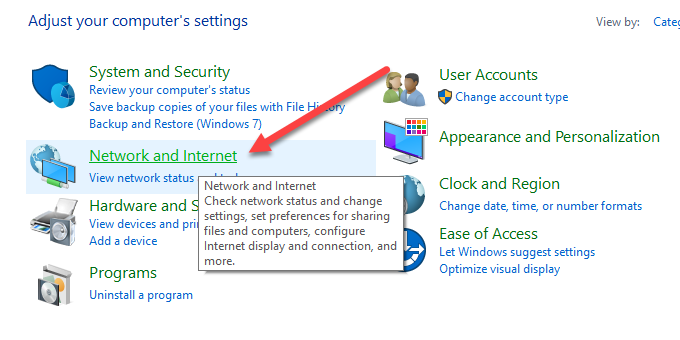
- If you’re using Windows, go to Control Panel > Network and Internet. If you’re in icon view, just click on Network and Sharing Center.
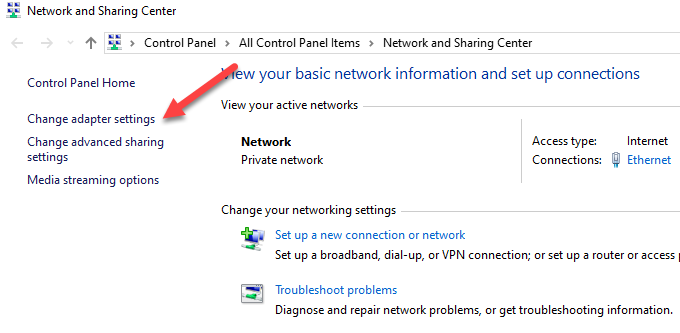
- Click Network and Sharing Center > Change adapter settings and double-click the connection. Depending on how you are connecting to the Internet, you will click on either Ethernet or Wi-Fi.
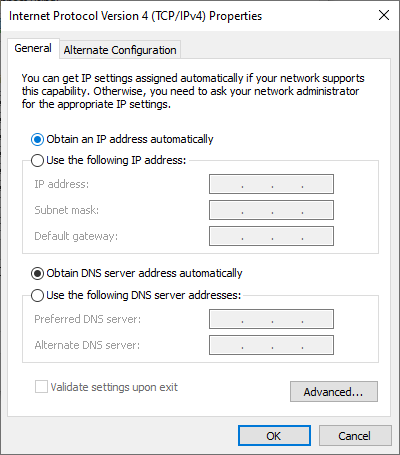
- Select Properties and then double-click Internet Protocol Version 4 or IPv4.
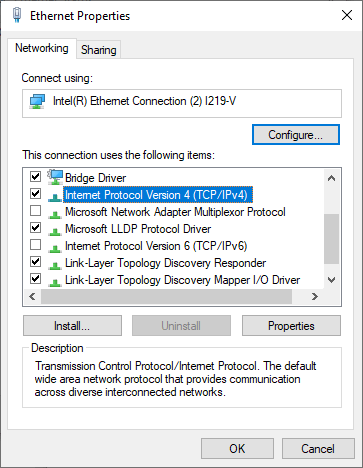
- At this point, you can change the IP address (but it will remain static), or choose Obtain an IP address automatically so that the router automatically assigns one to the computer.
Check Network Card
Your network card could also cause internet connectivity issues, so you can troubleshoot it to rule out any problems.
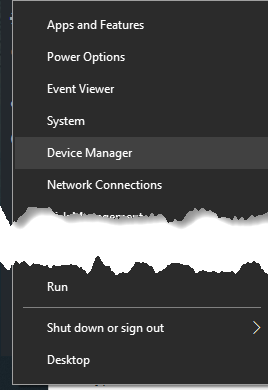
- Right-click Start > Device Manager
- Expand the Network Adapters category and check for any yellow exclamation mark beside your network adapter. If there’s none, the network card is working properly, but if you see the exclamation mark, right-click on it and select Disable device.
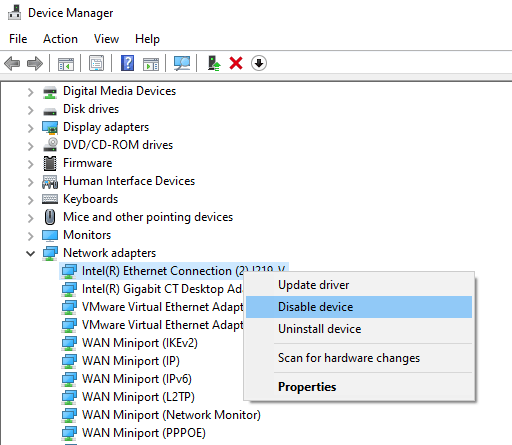
- Wait about two minutes and then right click Network adapter > Enable device. Check if the mark is gone, and then try your internet connection again.
If the mark is still there, there could be a problem with the network card. In this case, restart your computer or take it to a professional computer technician to have it repaired or replaced.
Check MAC Address Filtering
If your router has MAC address filtering set up, you may not have internet access. This setting blocks devices from connecting to the router if they don’t have a specific MAC address.
The easiest way to resolve this is to add your MAC address to the list of approved ones.
Reset TCP/IP
TCP/IP is a set of protocols that connect network devices over the internet and specify how data is exchanged. Resetting the TCP/IP involves entering a few commands into Command Prompt.
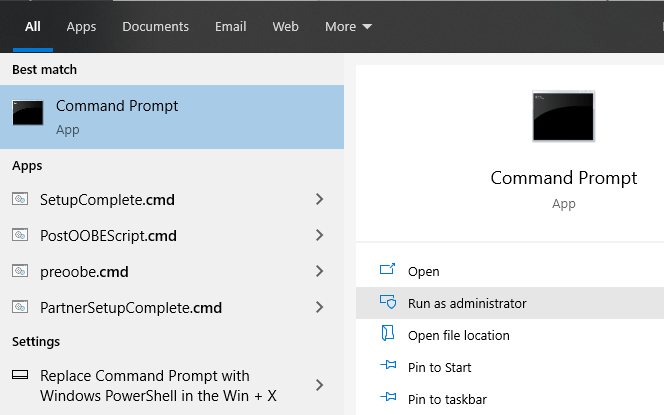
- Type cmd in the search bar and select Command Prompt > Run as administrator.
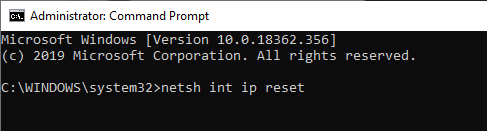
- Type netsh int ip reset and press enter. Allow it to complete and then exit the Command Prompt. Restart your computer once it’s done.
Flush DNS
This method also involves using a Command Prompt.
- Type CMD in the search bar and right click Command Prompt > Run as administrator.
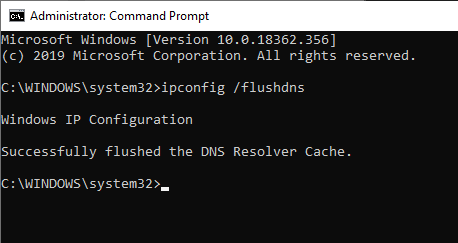
- Enter ipconfig /flushdns to refresh and reset your computer’s DNS settings and restart your PC to check if the internet connection is back.
Disable Security Software
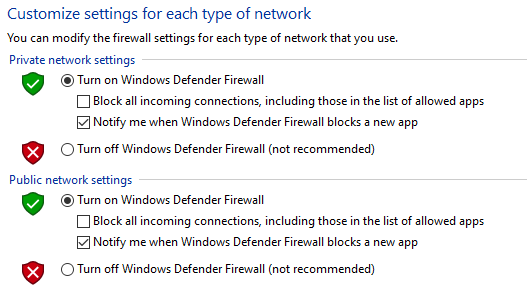
Your computer’s firewall and antivirus can prevent you from getting online.
Firewalls prevent unwanted network traffic from disrupting your computer’s normal functions, but they can also malfunction and block genuine traffic. Similarly, if you have two firewalls on one computer, they can conflict and block internet traffic.
To resolve this, disable any third-party antivirus or disable your computer’s firewall temporarily, and see if the connection is restored. You can also run a malware scan just to rule out any malware that could’ve disrupted your internet connection.
Update Wireless Drivers & Network Adapter Driver
Device drivers provide information about how your operating system and other software interact with particular hardware on your computer. If you still have no internet connection, check for driver updates on your computer.
- Right click Start > Device Manager, and then right-click on your wireless driver and select Update driver.
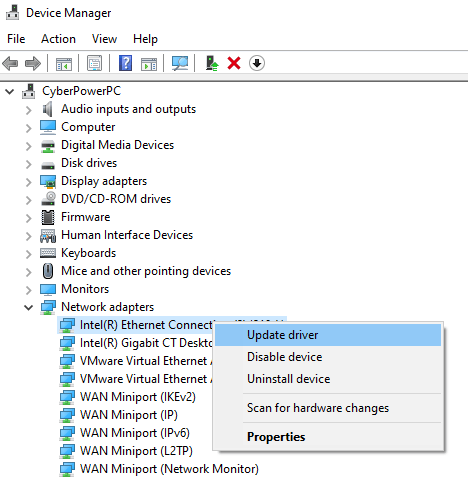
- Select to Search automatically for updated driver software or Browse your computer for driver software and then click Browse.
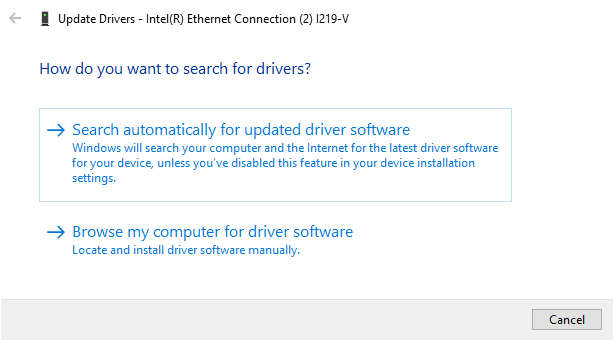
You can also uninstall the driver, and reinstall the correct drivers from the device manufacturer’s site. Restart the computer once done, and test the internet connection to see if it works.
Upgrade Router Firmware
Upgrading router firmware varies with every router, but there are some similar steps to take. However, it’s advisable to check the device manufacturer’s user manual that came with your router, or go online and check for specific instructions for your router’s make and model.
- Download the correct firmware from the manufacturer’s website. Go to the router’s hardware version download page and pick the right file.
- Most newer routers have a page in the admin interface that will check for firmware updates and let you upgrade directly like shown below. If not, download the firmware file and continue.
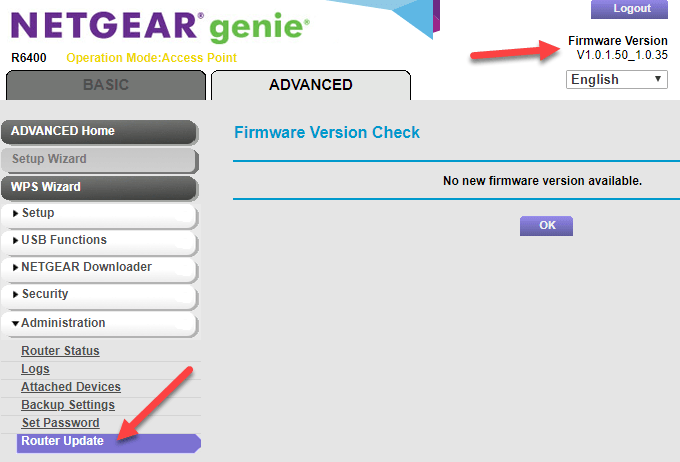
- Log into the admin console on your router, and locate the firmware section under settings – usually Management or Advanced. Confirm that your router’s firmware version you downloaded is the latest one compared to the current one you’re using.
- Move the firmware file to your router. You can search for instructions for this from the user manual or instructions on the website. Let the installation go on uninterrupted.
- Restart your router once the process is complete.
Reset Your Router
You can reset your router by pressing the physical reset button (usually a small recessed pinhole) on your router and hold it in for about 15 seconds. At this point, the router lights will blink and the router will restart.
If your router doesn’t have this button, log into the router and run factory reset from the settings panel.
Reset Your Network
If you still have no internet connection, reset your network settings.
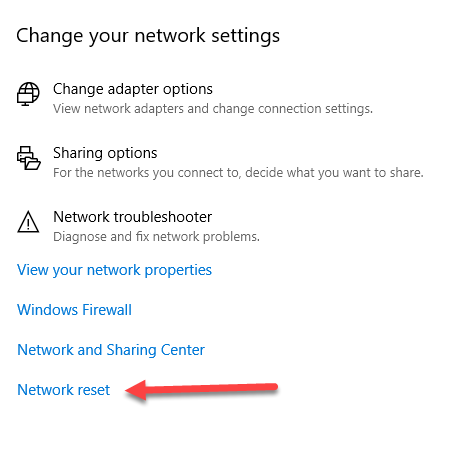
- Open Settings > Network & Internet > Status.
- Click Network reset > Reset now to remove all network adapters and return your network settings to the default settings. This means you’ll need to set it up all over again, but it could help restore your internet connection.
If nothing worked after resetting your router and network, you likely have faulty equipment. If it’s your router, you can try using a USB network adapter, contact your ISP provider or replace it altogether.
Your WiFi adapter or related hardware could be defective, or, your computer needs servicing. Similarly, your computer’s operating system could be corrupted, in which case you may have to erase everything and reinstall it but this should be done as a last resort.
We hope the steps described here will help you solve your connection issue. Hopefully, you won’t have to resort to factory resets, as most of the earlier steps tend to resolve it.
