
With all of today’s modern devices, some of the terminology can be quite confusing. Pretty much everyone has heard of the term router, but what does it actually mean? Is your router just a router or can it also be a switch, an access point and a gateway?
Back in the days, each term above usually referred to a single device that performed a single function. That is no longer true these days. Your “modem” from your ISP is probably a modem, router, switch and access point all-in-one. You don’t necessarily want an all-in-one device as I’ll explain later, though some ISPs push you that way.
In this article, I’ll try to explain the concept behind each of these terms without getting too technical. First, I’ll talk about the difference between switches and hubs, as both of those devices are in the same category. Next, we’ll talk about routers and why they are different than switches and hubs. Finally, we’ll talk about modems and other networking terms like access points and gateways.
Switches vs Hubs
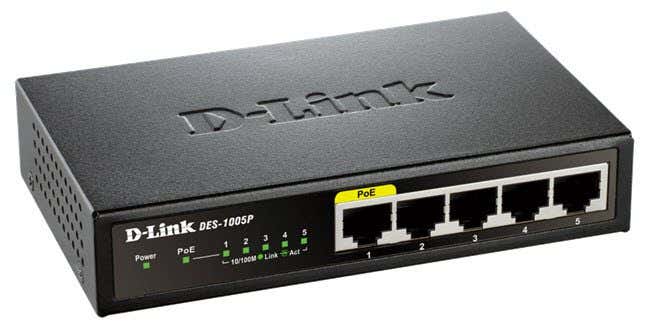
A hub is an obsolete device that you would never want to buy these days. It looks just like a switch, but works differently on the inside. You connect devices to a hub using Ethernet cable and any signal sent from a device to the hub is simply repeated out on all other ports connected to the hub.
Hubs are considered Layer 1 (Physical) devices whereas switches are put into Layer 2 (Data Link). This is where hubs and switches differ. The Data Link layer of the OSI model deals with MAC addresses and switches look at MAC addresses when they process an incoming frame on a port.
A frame is a data type that is used to carry data on all networking devices. Don’t worry about the technical details, just know that it contains source and destination MAC addresses and source and destination IP addresses inside the frame. The part of the frame that contains the source/destination IP addresses is called a packet.
Instead of blindly forwarding all the frames it receives on one port to all the other ports on the device, a switch will create a MAC address source table and then forward the frame to the port with the correct destination MAC address. This significantly reduces the amount of traffic on the network because there is direct communication between the two devices rather than a one-to-all type of communication.
With hubs, the more devices you connect to the hub, the more collisions there will be on the network. Collisions means when two computers or devices send data at the same time and the signals physically collide before reaching the destination. This happens on hubs a lot because all the traffic coming in on each port is repeated out to all the other ports.
With switches, there are zero collisions because only the two devices that are communicating will be sending data back and forth. The bandwidth is not shared with other ports.
This is also why a hub is a half-duplex device whereas a switch is a full-duplex device. The more devices on a hub, the more bandwidth that has to be shared and therefore the network gets slower. With switches, the bandwidth does not have to be shared and all ports operate at full speed.
Router vs Modem
Routers work at Layer 3 (Network) of the OSI model, which deals with IP addresses. Whereas MAC addresses are used to move frames from one device to another directly connected device, IP addresses are used to route packets across the Internet.
A router is a device that joins networks together and routes traffic between them. At home, this typically means you router connect your internal local network to your ISP’s network. This can be done in several ways. A router can be connected to your modem on one end (ISP) and to a switch on the other end (local network). If you have a combo modem/router device, then one end will connect to your ISP and the other will be either to a switch if using Ethernet or will simply be WiFi, if the device supports that too.
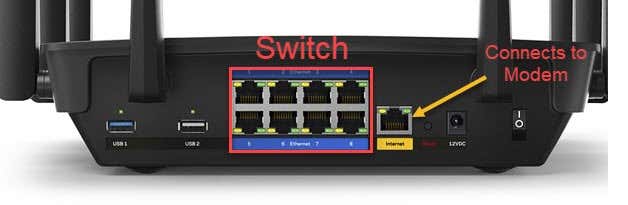
Above is a typical router only device (technically, it’s a wireless router above). The Internet port will connect to your modem and the rest of the ports are switch ports. A router pretty much always has a switch built-in. A modem will connect to your ISP using phone line (for DSL), cable connection or fiber (ONT).
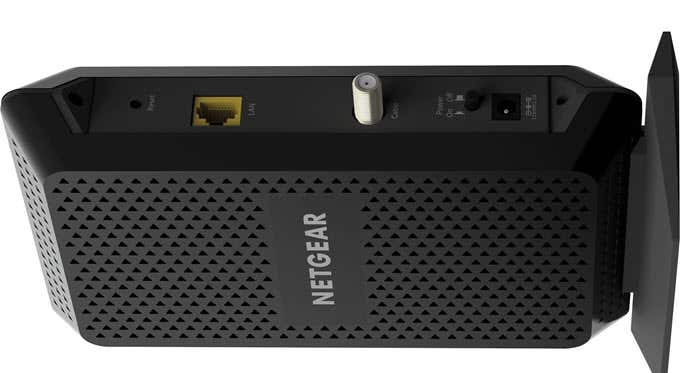
Above is a typical cable modem. It has a single coaxial port for the cable connection coming in from your ISP and a single Ethernet port that you could plug into the Internet port on your router. If possible, it’s always best to have two different devices for your modem and router.
A wireless router simply allows you to share the wired connection with any wireless devices you may have. Most routers these days are wireless routers that include several wired ports also.
Wireless Router vs Wireless Access Point
Now let’s talk about wireless routers vs wireless access points. A wireless access point is a device that allows wireless devices to connect to an existing wired network by bridging traffic between the two networks. The reason why these two terms are so confusing is that a wireless router is basically a router and a wireless access point combined.
However, a wireless access point cannot be a wireless router. A stand-alone wireless access point will have an Ethernet cable running to the router and convert the wired signal into a wireless one. It will not route packets from the local network to anther network or the Internet like a typical router.
Wireless Access Points are typically used by businesses or in big public spaces where they need many wireless stations all connected together to form one network. Wireless routers typically have firewalls built-in too, while wireless APs do not.
Other Networking Terms
One of the other very common terms you will hear is Default Gateway. So what is the default gateway? It’s basically the device that connects your local network to the outside world. Typically, this is the last router on your local network.
On a home network, the default gateway will most likely be your wireless router because anytime you need to communicate with a device outside your network, the router is the device that is connected to your modem. Note that to communicate with other devices on your local network, you do not need a default gateway. Default gateways are only used when communicating with remote networks, i.e. the Internet.
Hopefully, this clears up some of the mystery behind all of these networking terms. It’s a simplistic overview, but enough that you can explain it to someone else. Enjoy!
