Related Posts

30 Comments Already

commenter
Mike Johnson Said,
January 14th, 2010 @3:06 pm  

Thanks much. Have had the same problem with older pgm of Spanish Learning. However, my experience was not quite the same. If clicking on the red X 3 -5 times, eventually the document would open. I’m using Windoze XP Pro and Office 2000. Hadn’t tried to open it in WordPad so don’t know if that worked or not.

You’re a valuable asset; if I can help at all please let me know. I do repairs on Computers (hardware) and various electronic equipment. Have professional company in So. CA.

Mike
OregonMike@att.net

commenter
mariaquea Said,
January 20th, 2010 @9:15 am  

I’ve got a problem with my computer. It started by deleting the names of my files, and replacing them with squares and other funny symbols.

Now I just find it impossible to save my files from my laptop to my pen drive, to open in another computer because. This is because I keep getting the message “word cannot start the converter mswrd632. I’m just wondering if this could just be a virus, because most my files are unreadable.

Please just tell me what is wrong with my computer. It just started all of a sudden!

commenter
Raju Said,
February 1st, 2010 @5:53 am  

This did not help with the problem in Word. Any other suggestions?

commenter
mukesh goyal Said,
February 19th, 2010 @8:39 am  

i delete the mswrd6.wpc acc.to given in method 1. even that my word files are not opened yet, what can i do more please give sol.

commenter
Khal Said,
March 4th, 2010 @3:05 am  

After I got the following message: “Can not start converter MSWrd632″. I lost my word file after clicking ok to convert. Can I return to the file again….the file is 0 bytes.

Thanks
Khaled

commenter
Carlos Said,
March 17th, 2010 @8:56 pm  

Wlw, it worked. I deleted MSWord6.wpc and that resolved the problem!

commenter
Mouse Said,
March 22nd, 2010 @12:45 pm  

I tried this solution, but I’m still getting the same message. Please help!

commenter
jake Said,
March 23rd, 2010 @10:31 am  

ya same here. tried all methods everyone has described (couple others on other sites), and i still get this message. grrr

commenter
Don Bishop Said,
March 31st, 2010 @6:06 pm  

I’m getting this message while trying to open a Mac Word file in MSWord 2007. Deleting the registry entry didn’t help. When the file finally opens, it is full of non-printable characters.

commenter
KSMarko Said,
April 4th, 2010 @5:05 pm  

I deleted the following regedit key “HKEY_LOCAL_MACHINE\SOFTWARE\Microsoft\Shared Tools\Text Converters\Import\MSWord6.wpc” and it did not do the trick. How do I get it back?

commenter
Stephen Bradley Said,
April 8th, 2010 @1:16 pm  

The fix of deleting the mswrd632.wpc registry key is meant to correct the problem of failure to open a text file with a .doc extension (this used to be very common). However, many people, including me, who are receiving this error message are trying to open Word 2003 files – not text files with the .doc extension. The MS fix does not work.

Though I have found numerous inquiries on the Web about Word documents, I have only found solutions stemming from the MS fix for text documents.

commenter
sqwhelpdesk Said,
April 13th, 2010 @7:27 am  

Hi,

I have tried all of the possible fixes to resolve this error, but am still unable to resolve the problem.

Using XP, SP3. Office 2003, compatability pack for 2007

We deploy WSUS updates and so far we have had two lots of bad updates…this convertion one being the second. so far only myself and two other colleagues have complained about it.

I have edited the registry, to allowconversions, I have deleted the registry edited as suggested above, I have removed the KB970304 Update, and finally copied the text conver folder from a known workiing PC across and still no luck! I have done plenty of restarts in between each task! this document the user cannot open from outlook is clearly a .doc as another user can open this fine with a few pages of data, so why can’t myself and two other users do the same? we should all be getting the same updates…we all use the same OS and sp packs are all the same…we even tried opening this doc on one of the machines having installed office 2007 and then the beta 2010…

I’m pulling my hair out and have spent way too many hours trying to clear up Microsofts crap updates….

someone please help me, please!

commenter
Srinivasa Rao Said,
April 15th, 2010 @11:23 pm  

Hi,

When opening the word document from an application, it is throwing the above error. what will be resolution in this case?

commenter
Jose Lsui Said,
April 16th, 2010 @10:26 am  

hola k tal, sabes hace unos dias quice abrir unos archivos y me sale una ventana, con unos cuadrados haciendome entender k el archivo no se ah podido convertir, cosas asi sale una ventana con simbolos, es decir cuadros, punto, comas, etc. noc d k manera me pudieras ayudar para abrir estos archivos. t agradecere de antemano tu ayuda. quiugar_la_88@hotmail.com

commenter
kim_1784 Said,
April 21st, 2010 @9:32 am  

This site is good..
remove this registry key..
HKEY_LOCAL_MACHINE\SOFTWARE\Microsoft\Shared Tools\Text Converters\Import\MSWord6.wpc
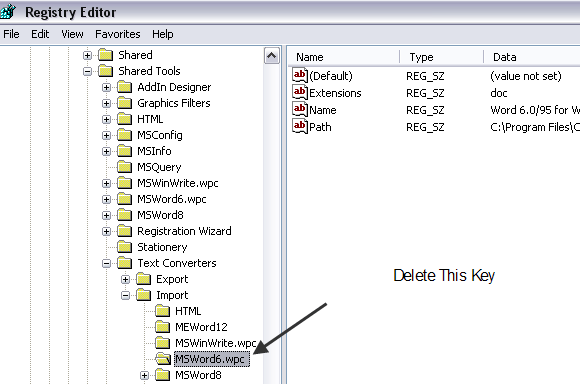
remove this files.
C:\Program Files\Common Files\Microsoft Shared\TextConv\mswrd632.cnv
C:\Program Files\Common Files\Microsoft Shared\TextConv\mswrd832.cnv

commenter
branney Said,
April 23rd, 2010 @12:41 pm  

None of these solutions have worked.

commenter
Kcalv Said,
April 27th, 2010 @9:49 am  

I am having the problem described above (getting message that it cannot start the converter mswrd632.wpc. I have XP 2002 and cannot find the text converter file you show in the registry.

commenter
Mike Carlyle Said,
April 30th, 2010 @12:43 pm  

Thanks bunches. This did the trick!

commenter
Mike Said,
May 3rd, 2010 @3:15 pm  

I am getting this error as well. Using Word 2003 and they are Word documents. This is critical to find a fix as I am sending out my resume and I am afraid they are not opening for the receiver. Two have notified me that they would not open. I have tried everthing listed above and one time it worked for a while and then started up again. I need a fix bad. Can anyone help. Has anyone tried reloading Office 2003. Any help would be appreciated.

mlowman@ix.netcom.com

commenter
Ayman Adel Said,
May 3rd, 2010 @4:20 pm  

please we really need advice for the same issue, me too after I got the message “Can not start converter MSWrd632″. I lost my word file after clicking ok to convert. it’s not deleted but it’s plain. Can I return to the file again….the file is 0 bytes

Thanks…

commenter
taco115 Said,
May 7th, 2010 @3:25 pm  

This worked for a user of mine using Word 2003:

1. Open regedit, Navigate to HKEY_LOCAL_MACHINE\SOFTWARE\Microsoft\Shared Tools\Text Converters\Import\MSWord6.wpc

2. EXPORT the key BEFORE deleting it.

3. Delete the key

4. Navigate to C:\Program Files\Common Files\Microsoft Shared\TextConv and RENAMED the following files:

mswrd632.wpc -> mswrd632DOTwpc
mswrd832.cnv -> msword832DOTcnv

I don’t know if it is necessary to rename mswrd832.cnv, but I did it for sake of being thorough

commenter
Bill Said,
May 10th, 2010 @12:37 pm  

I have tried all the same things. We have Word 2007 installed, and are trying to open Word 2003 files. We are using WinXP, anyone else have any suggestions? Anything elsel that we can try?

commenter
Roddy Said,
May 11th, 2010 @2:11 am  

I have Windows Word 2007 and I have read the comments above, I have the same problem. If I try to convert the text it simply won’t work, the converter tells me to “choose the code that makes the text readable” but none does. I have already tried to uninstalled the converter, as sugested above but the problem remains unsoloved. The weidest of all is that it´s just a few documents that I have trouble with, the others work perfectly. Please help me, I really need those documents.

commenter
Sisili Said,
May 24th, 2010 @10:17 am  

I still have problems with MSWRD632.WPC error. Please help immediately.

commenter
silvia Said,
May 30th, 2010 @10:50 am  

hi! i’have the same problem..
as Roddy said only same documents not open, other open normally!!
i haven’t MSWord6.wpc but only MSWord8.wpc on my registry.. i have to delete this or not?

commenter
Harriop Said,
June 2nd, 2010 @8:44 am  

I deleted the MSWord6.wpc, but still get the error. I’m trying to open an email doc. attachment.

commenter
Joy Said,
June 5th, 2010 @5:48 am  

This didn’t work for me. Now it wants me to select the file encoding to make it readable. Any other solutions?

commenter
Veesixteen Said,
June 7th, 2010 @6:25 am  

I recovered some “.doc” files I had deleted in error, 2-3 days ago. I used “On-Track Easy Recovery” software. I got the files back OK but when I try to open them, I get the error message: “Word Cannot Start the Converter MSWRD632.WPC”. I am able to open all other “.doc” files in my computer. Why not these? Any ideas?

commenter
rmoore Said,
June 9th, 2010 @3:52 pm  

I haven’t had the problem myself but has anyone having the problem looked at Microsoft’s website for a solution?.

Check out http://support.microsoft.com/kb/973904

After getting to the website, FIRST see if there is a disclaimer at the top of the page before doing anything else.
The disclaimer may read something like this:

System Tip
This article applies to a different version of Windows than the one you are using. Content in this article may not be relevant to you.Visit the Windows 7 Solution Center.

At the bottom of the page, there is a list of Operating systems this fix applies to.

There is a Fix it button that presumably one would just click on to make the corrections and for the more adventurous, there is a Fix it myself button.

I would create a restore point FIRST or better yet, a good backup of my C: drive and then I’d give it a try.

APPLIES TO
Microsoft Windows XP Home Edition
Microsoft Windows XP Professional
Microsoft Windows 2000 Advanced Server
Microsoft Windows 2000 Datacenter Server
Microsoft Windows 2000 Professional Edition
Microsoft Windows 2000 Server
Microsoft Windows Server 2003, Datacenter Edition (32-bit x86)
Microsoft Windows Server 2003, Enterprise Edition (32-bit x86)
Microsoft Windows Server 2003, Standard Edition (32-bit x86)
Microsoft Windows Server 2003, Datacenter x64 Edition
Microsoft Windows Server 2003, Enterprise x64 Edition
Microsoft Windows Server 2003, Standard x64 Edition
Microsoft Windows Server 2003, Datacenter Edition for Itanium-Based Systems
Microsoft Windows Server 2003, Enterprise Edition for Itanium-based Systems
Microsoft Windows XP Professional x64 Edition

commenter
July 10th, 2010 @2:17 am  

Thank you!
I just experienced this problem today. I had been reading the error in the Help Desk Geek newsletters for the past one week but I never bothered clicking on the who article…

Please Leave Your Comments Below

Please Note: All comments will be moderated