 Aseem Kishore · April 23, 2009 · 3 min read
 Update Oct 2017: Citrix no longer provides the XenConvert tool as a download and doesn’t support it anymore. Your only options now to convert a physical machine to XenServer is to first get it into VHD format (using a tool like Disk2VHD) and then import it in. If you are wanting to convert a VMware virtual machine to XenServer, then you can try to use the XenServer Conversion Manager feature.
The Citrix Xen Server is a free enterprise-class server virtualization solution that is a direct competitor to VMware ESXi. Both are free and it’s actually quite hard to tell which one is better.
Some people swear by VMware because of longer experience with virtualization technology while others say that Citrix has a better product. I’m not really sure, but in this post I’m going to talk about one feature that the VMware product does very well: converting a physical server into virtual server.
It’s pretty much the easiest thing in the world to virtualize a physical server using VMware, but a bit more involved using Citrix Xen. Actually, it’s not a difficult process, it’s just not as easy to find for some strange reason, than the tool for VMware.
Note: There are two tools for physical to virtual conversion (P2V) when working with Xen, either Linux to Xen or Windows to Xen.
Move Windows Server to XenServer Host
To import a Windows machine, you will need the XenConvert tool, which comes in 32-bit and 64-bit flavors. You can use this tool to perform the following type of conversion:
Convert a single VHD or an entire virtual machine to a XVA or XenServer (VHD to XVA)
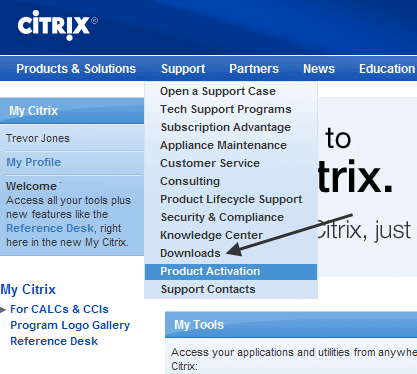
So where do you find the XenConvert tool? Well, it’s not exactly in the most conspicuous place known to man. In order to download it, you have to log into MyCitrix and then click on Downloads and finally click on XenServer 5.
When you click on XenServer 5, you will see a link in the Helpful Resources section to XenConvert for 32-bit and 64-bit. Kind of a pain and not really sure why they don’t have it on the main site since it’s a free download!
Move Linux Server to XenServer Host
In order to P2V a Linux server to a XenServer host, you need to reboot the machine you want to convert and boot from the XenServer Installation CD.
When you see the Welcome to XenServer screen, select OK and the installer will do some hardware detection, etc. After that, you will get four choices, one of them being
Convert an existing OS on this machine to a VM (P2V)

And that’s it! Follow the rest of the prompts and the server will be virtualized. After it is complete, you will need to attach a VIF in order to have external network connectivity.
If you are having issues converting either a Windows or Linux server to XenServer, post a comment and I’ll try to help out! Enjoy!
