Recently, I was working with a client and they had an issue updating their Windows 7 PC. Basically, whenever they tried to run a check for updates, they would get the following error message:
Windows Update cannot currently check for updates, because the service is not running. You may need to restart your computer.
Of course, restarting did not help. When we checked if the Windows Update Service was running, we found that it was running. So now we were confused.
In this situation, you can solve the problem by deleting all the currently downloaded updates and retrying. Sometimes an update gets corrupted and then Windows gets confused and thinks the service is no longer running.
The first thing to do is to stop the Windows Update service on your Windows 7 machine. You can do this by going to Start and typing in services.msc in the search box.

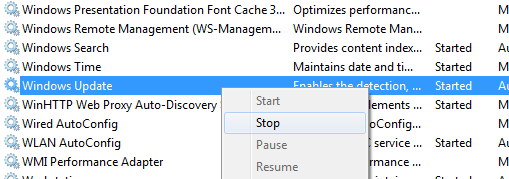
Next, press Enter and the Windows Services dialog will appear. Now scroll down until you see the Windows Update service, right-click on it and choose Stop.
Now that the Windows Update service has been disabled, you need to go to the following folder and delete all the files and folders inside of it:
C:\Windows\SoftwareDistribution\
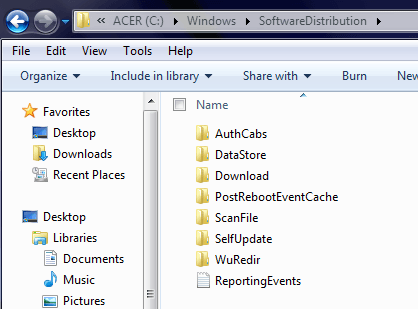
Once you have deleted everything, go back to the Services dialog and right-click on the Windows Update service and choose Start. All the files and folders will be re-created and hopefully you can start downloading updates for your PC.
If you’re still having problems, make sure to check out our previous posts on removing and reinstalling all Windows Updates, troubleshooting An Update Failed to Install error, and fixing Windows Update Error Code 8E5E03FA.


Thanks this was really helpful. I had a completely new installation that wouldn't update at all. Clearly a Windows 7 bug as many people are struggling with this.
Kurt
I am also having the same problem. I just recently upgraded my Lenovo SL510 Laptop to a Western Digital 750GB hard drive. I clean installed Windows 7 32 bit on it and found that I could not install any Windows updates. I have contacted both Lenovo and Microsoft the assist with resolving this issue and neither one has been able to do anything. If I put the old Seagate drive back in I am able to update my system with no problems. Any suggestions. Yes, all of the services are running. Microsoft made sure of that. Thanks
Good tips …my Windows Update is running again!
Thanks. The first step (enabling the service) worked for me. I didn't need to go to C:WindowsSoftwareDistribution and all.
Thanks!
Just to share where I am having the same problem but Windows Update & BITS services are running well.
Finally I found the problem is cause by Intel Rapid Storage Technology (RST) which suppose to enhance the SATA disk performance. Problem solved after I download and install the latest version from Intel.
So the first thing to check is to ensure all third party drivers are the latest version.
Hope this help.
This also fixed my problem. Amazing that you figured this out. Please do this if you are running Intel RSY… it works!
I can't find Windows Update service, so I can't stop it. Please help.
Thanks kwfoo.
I had exactly the same problem on a new W7 install and once I updated the Intel Rapid Storage Technology driver, all was well.
I would never have thought of that if I had not read your post.
Thank you a lot for posting this. I have been messing with my laptop for days since I reformatted it just before Xmas, and despite being very computer savvy, I couldn't figure it out. All I knew was that it froze whenever I tried to run it, and that only rebooting it in services with it open would get me to the "check updates" page.
Thanks to your post, I finally got the update check to run and updates are currently installing. I really appreciate it, and I hope you had happy holidays! :)
Hey, guys!
I am from Brazil, but I bought my Sony Vaio VPCF1 in the USA. Well, once here in my country, I bought a Portuguese version of the Windows 7 Ultimate. After several, but solved, installation problems, I got stuck on the Windows Update failure.
Thanks to kwfoo! I finally solved this issue.
Alessandro Albuquerque
Brasília
Brasil
This fix worked perfectly. However, is it possible to "undelete" the Update History as you cannot see it anymore?
Thanks. It work perfectly. I was scared thinking that something was seriously wrong with my computer.
Wow! Your solution works! Sorry to sound surprised but have spent a long time on this Microsoft weakness. Thanks so much. For those that get told that spyware causes the problem: Maybe it does, but in my case it was a problem from Day 1 with a brand new PC and new Windows Premium 64 before I loaded anything additional!
Wow, it worked! I don't know how to thank you!!!
Great. Best solution I have found!
I had to start all over again with a new hard drive (old one died) and it could not update. I followed the first guy's instructions and updated the Intel Rapid Storage Technology driver. I don't know why this driver affects the update process, but it works now.
The Rapid Storage Technology driver update, this is what finally
solved my problem. I had tried the fix at the top without success.
That is brilliant. I've been looking for this fix for days now. I've just reinstalled Windows and the problem was still there. Then, I found your solution straight after.
Unfortunately, I didn't see it before, but, many thanks!!
After deleting and restarting, an error follows; 'cannot find specified file'.
This post really helps!
You solved my problem. :)
Thanks.
I have a windows update error about once a month lately. Have tried every solution posted. I have discovered a simple and easy method!!! It works every time for me (so far).
Go to Internet Explorer -> Tools -> Internet Options -> Connections -> LAN settings: if it is set to AUTOMATICALLY DETECT SETTINGS switch it to
PROXY SERVER (port 80) that port was already there for me. Click OK and try Windows Update.
Option 2. If it was set to PROXY SERVER, switch it to AUTOMATICALLY DETECT SETTINGS. Try again. Don't give up yet. Switch back to PROXY SERVER. Finally, Windows Update should work!
Oh my goodness this simple fix solved a problem that i have been beating my head against for TWO DAYS. I've a Vista machine here so I wasn't sure it would help but it does indeed work on Vista. Specifically, Vista Home Premium 32 bit, on an Acer Aspire 4530 – problem began on a clean load of Windows immediately after installing the SMBUS driver.
Thank you so much! I realize this is a very old post bu thank you anyway.
OH MY GOD! Thank you soooo much! This problem has been bothering me A LOT since when I play games on this computer it was all laggy and stuff. For a while I tried to keep it up with Registry Booster which sorta helped but not quite. After I got this PC back from repair, Windows Update hasn’t been working at all, until now! :D lol 71 updates needed! But anyway, YOU SHOULD GET HONOURED WITH THE TITLE “Sir”
thanks lots, it work perfect!!!
Fantastic. Thank you very very much
You are the man!!! Worked like a charm. Glad I didn't listen to so-called Microsoft MVP who declared it to be a uncurable virus that mandated clean install.
Thank You. That helped me a lot. Windows 7 seems to be so buggy. That's my 3rd serious bug in this windows.
1st one was that it stopped being genuine at 1am last month (was disabling onboard display to FORCE ION2 HDMI output on TV that didn't want to work well without doing so) that required me to restore hd image from windows backup. 2 weeks of work lost. Fixed.
2nd one is memory overflow when using HDMI display on Nvidia ION2 netbook (maybe it's global HDMI or nvidia problem). After few times switching on/off monitor while having DirectX game open, there are huge memory corruptions. Programs won't start, they crash until restart, and while multiply clicking windows update check, it fails everytime AND CORRUPTS WINDOWS UPDATE FILES – that made me search for this sollution. NOT FIXED!
3rd was this one. Fixed.
Windows 7 certainly is better than Vista but it still has VERY SERIOUS PROBLEMS AND BUGS. Microsoft should really pay more attention to their products!
I recently replaced my HD and used Windows recovery to restore my system. Neither Windows update or Live Messenger worked after that. I tried the method suggested above in stopping and then re-starting the update service after deleting files but that didn't work either. I then checked for updated drivers at http://www.intel.com/p/en_US/support/detect/ and, after updating three drivers, everything now works as it should! Thanks, kwfoo!
I know this entry is a lil'bit old but thank to you Aseem, my girl friend's laptop is now back again. :)
Thank you.
Hi, I had the exact problem just like:
"starquest9 Said,August 13th, 2010 @12:23 pm I am also having the same problem. I just recently upgraded my Lenovo SL510 Laptop to a Western Digital 750GB hard drive. I clean installed Windows 7 32 bit on it and found that I could not install any Windows updates. I have contacted both Lenovo and Microsoft the assist with resolving this issue and neither one has been able to do anything. If I put the old Seagate drive back in I am able to update my system with no problems. Any suggestions. Yes, all of the services are running. Microsoft made sure of that. Thanks"
I am just wondering if starquest was able to fix his problem, if so, how? I tried pretty much everything and still doesn't work. Please help, much appreciated in advance. I am running Windows 7 Home Premium on a Lenovo SL510
Thanks a ton. Spent 3hrs already on other tips to fix this and yours worked!
Thanks for the tip, worked like a charm.
Many thanks from NZ..as per previous posts installing Intel RST did the business for me. Very grateful as has saved me $ and time.
I had this problem on Windows Vista, and this solved it. Thanks!
Thanks!, Just got a new hard drive for my laptop. Windows wouldn't update after installing the operating system. This fix worked.
Thanks you, my bestfriend. It's very useful for me :*
Thank you! After hours looking on the internet, you gave me the correct solution! Nice work!
Just a note of thanks.. This happened on 2 computers which I had cloned drives to increase space.
Microsoft should have this information on their support site.
You are a genius. I followed your open “services.msc” and delete all the files and it worked.
But a big WTF to the guy that talked about a virsus causing this problem on the microsoft site.
Thanks!
Thank you! I've been battling over the same problem for a number of days now and had tried and retried all the suggestions from Microsoft.
After stopping the service, deleting the files, restarting the service and then running windows update I found I had 15 Important updates which I'd missed!
Thanks again.
I have a lenovo T410 that had the same problems with the windows update and the optical drive was always powering down and could not be turned on without booting in safe mode.
I tried all the suggestions here and elsewhere and finely found there was PC doctor on board but disabled.
After a system scan it listed some issues and some updates that addressed these problems. It also needed updating,
. I downloaded and installed the windows updates. Now all seems to be well.
I am so frustrated with M.S. that I now run UBUNTU O.S. as a duel boot for most of my computer needs,
Great solution. works great!
@kwfoo
Your suggestion worked! I installed a new SATA drive on my Lenovo u450p laptop and could not get windows update to work even though the windows update service and the BITS service was started.
I installed the Intel Rapid Storage Technology driver from Intel's website, restarted my computer, and windows update is working.
Thanks again!
it worked! thanks man!
My issue was with a Dell Inspiron 1521 that I ” Factory Restored ” to Vista Home Basic 32bit…
==
Windows Update Error screen: [Big RED Vertical Bar and text]
Windows Update cannot currently check for updates, because the service is not running……..
==
Apparently, I am NOT the only one.
Hope this is of some value…
P.
=============================================
http://helpdeskgeek.com/windows-7/cannot-run-wind…
I thought deleting the entire [ C:WindowsSoftwareDistribution ] directory structure was ‘excessive’, so I looked and decided to ‘take-out’ the contents of the DataStore directory..
Directory of C:WindowsSoftwareDistributionDataStoreLogs
10/11/2011 07:55 AM .
10/11/2011 07:55 AM ..
10/11/2011 07:55 AM 8,192 edb.chk
10/11/2011 07:55 AM 131,072 edb.log
10/11/2011 07:55 AM 131,072 edb004D5.log
10/11/2011 07:43 AM 131,072 edbres00001.jrs
10/11/2011 07:43 AM 131,072 edbres00002.jrs
10/11/2011 07:55 AM 131,072 edbtmp.log
10/11/2011 07:43 AM 65,536 tmp.edb
7 File(s) 729,088 bytes
Press any key to continue . . .
Total Files Listed:
8 File(s) 1,785,856 bytes
5 Dir(s) 126,952,452,096 bytes free
I then navigated to [ C:ProgramDataMicrosoftWindowsStart MenuWindows Update ] Right-Click Windows Update “Run as Administrator”
VIOLA!!!! it worked.!!!!!!!!!!!!!!
OMG thank you! even microsoft tools don't work, but i found it! THANK YOU VERY MUCH
Lithuania
This works wonderfully, but you MUST reboot a Vista machine before Windows Update will start working again.
Thanks a lot for posting this. I have been messing up with my new HP Probook laptop for days since I bought. Despite being very computer savvy, I couldn’t figure it out. Whenever I click on “check updates” it used to display a mesaage “Windows Service is not running…u may need to restart your computer”.
Thanks to your post, I finally got the update check to run and updates are currently installing. I really appreciate your help.
Thanks
Thanks! A corrupt update through WSUS knocked out 40pcs in one go – all started showing this. We were very confused! Thanks again for the fix.
This was great advice. My updates are now working with this fix. TY
Thanks for the tip and the comments from everyone else. My drive had bad sectors so I put a 1tb drive in and updated from a backup. I tried deleting old updates, no luck, then downloaded the newest Intel RST and it works again. Cheers.
Thank you very much for this. It's hard to believe that none of the long-winded solutions from the official Microsoft support site and Windows 7 forums worked but your simple and easy to understand fix worked the first time with minimal fuss.
Cbz
Excellent thanks man…
Big thanks… worked great!
Dude, You are AWESOME. Dell 15XPS laptop HD died, replaced drive (WD Blue 750 GB) and reinstalled from the Recovery Image (no Windows DVD with system). Windows Update was DOA. Tried updating the Intel Rapid Storage Driver but that did not work. Stopping the Update service then deleting the files in the SoftwareDistribution folder and then starting the Update service worked perfectly. You have lived up to your moniker! Thanks. John
Spent many days trying to solve this problem, and you sorted it out for me in minutes. Cannot thank you enough. Best wishes for Xmas.
I've been fighting with this for days before I found your tips – you'd think the Windows Update troubleshooter could be updated to incorporate this simple fix…
your windows update fix worked PERFECTLY thank you very much
Incredible solution. I searched a lot on the net but could not find an easy solution. Thanks Buddy.
Kumar
Thanks a lot man!
Thanks a lot for your post. I was having this problem on Mac book with windows 7 as parallel. Saved my time on figuring out this issue. Thanks again for your help.
After weeks of debugging, chasing imaginary spyware, your simple fix did the trick!!
Thanks for this great post
You rock!! That was a huge help.
Thank you! Solved my problem as well. You saved me a re-install. Kevin
I had tried all kinds of fixes last night and finally tried this. Worked like a charm. Thanks!
-Paul
This worked perfectly. Thanks for the simple and easy to follow solution.
Wow – this actually worked, after all other Microsoft recommended fixes failed. Thank you veyr much, sir!
I LOVE YOU SO MUCH!!!! Thanks
AWESOME!!! It worked!
THANK YOU! Only for me, the latest Intel drivers didn’t work, had to go back to Version 1001
But you at least showed me where to start. Awesome!
Thanks so much! Great walkthrough. Worked perfect. Better than the crazy fixes I read prior!!!
BINGO! fresh install w7 ultimate N – kept getting this error – technet support was silly (why don’t they know about this?)
Thanks for the tip – updates working now… although given MS’s update bungles – it might have been a blessing keeping it disabled.
THANKS a TONNNNNNNNNNN dude…..really this helped me alot.
Thanks you so much – this worked for me. I was able instal Windows7 updates.
Thank you! It worked! I tried Microsoft’s Fix It tool and many other suggestions that didn’t work.
Thak you very much for sharing this step by step guide. After a hard disk crash on my lenovo laptop I bought a new hard disk and installed the software using the factorey recovery disk and when tried to update windows I got that weird message. Hpefully I found your post and now works normal.
nice tips..it really works…im running my updates again…thanks..
PerformOperation on exe returned exit code 3355443746 (translates to HRESULT = 0xc8000222)
Yes indeed your above solution worked well and solved my problem, now windows update is running and no more above error. thanks
Man !! I had my hopes up so HIGH!! I have tried EVERYTHING listed here and then MANY others… NONE work :( Any other ideas or suggestions? I have been hunting fixes on this issue for MONTHS, trying everything I could find, to no avail.
Thanks in advance :)
Ran several Microsoft Fix-it utilities, reset the Windows Update, ran the WU Repair utility, and nothing worked except your solution. Kudos to you, and thank you for sharing your expertise!