Related Posts

34 Comments Already

commenter
RANCID FC Said,
November 21st, 2009 @5:33 am  

Many thanks pal. I have followed the instructions above and it works a treat. Take care.

commenter
noxfiend Said,
December 4th, 2009 @2:07 am  

tried exactly what you said and even after changing to admin rights etc still get the same error message saying i dont have permission only it doesnt say trusted installer now it says administrators… so your advice seems pretty much useless although it may only be me…

commenter
noxfiend Said,
December 4th, 2009 @2:24 am  

i take my comment back, i apologize, a small error on my part stopped me from getting anywhere… your advice couldn’t have been better, cheers mate!

commenter
jim jones Said,
December 4th, 2009 @8:42 am  

Now it just says that I need the administrators permission. Goddam Windows.

commenter
Paul Watson Said,
December 15th, 2009 @6:30 pm  

I started using Live Mail while I was on Vista-64 (upgrading from Windows Mail). After upgrading to Windows 7 64-bit, Live Mail had a lot of glitches and doesn’t receive all of my emails. On my C drive I have two program folders: “Program Files” and “Program Files (x86)”; each folder has both “Windows Mail” and “Windows Live Mail” folders, and I found some of my recent missing emails in one of the “Windows Mail” folders.

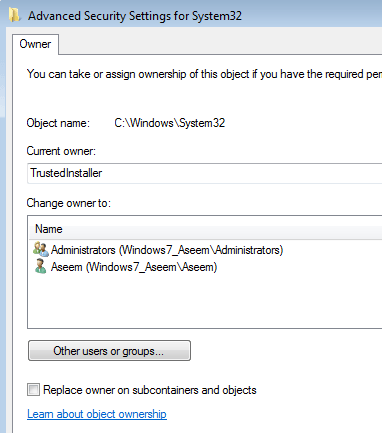
So, I am trying to delete both of the old “Windows Mail” folders (thus leaving the “Windows Live Mail” folders in both program file folders). However, I cannot seem to effectively change the permissions so I can delete them. I followed your instructions step by step to change permissions on both of those “Windows Mail” folders, but when I close everything and come back to the C: folder and right-click on “Windows Mail” and click “Delete”, it says it needs permission from “Paul Watson PC/Paul Watson”, which IS what I am logged in as.

The same thing happens if I try to delete the folder content files, even one at a time. For some reason “Windows Mail” is active enough to intercept emails that should be going into Live Mail, so is there any way to deactivate or delete those old Windows Mail files?

commenter
DENZO Said,
December 27th, 2009 @10:54 am  

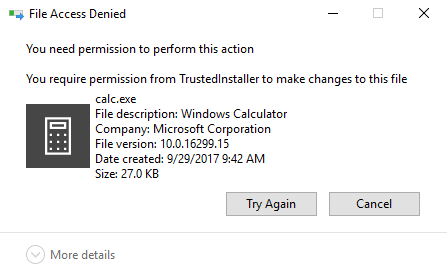
You my friend, are the F***in MAN!! Thank you. I was wondering what the hell “Trusted Installer” was and why it was preventing me from deleting files on my own computer!

commenter
djmicu Said,
January 14th, 2010 @12:53 pm  

Thanks for the detailed instructions!!

commenter
Tomo Said,
January 17th, 2010 @7:35 pm  

Excellent Info! Many Thanks! TrustedInstaller was the problem!

commenter
ReneF Said,
January 18th, 2010 @8:46 am  

Excellent. Was able to delete 40GB of junk. Thanks

commenter
Chatula Said,
January 23rd, 2010 @6:51 am  

Hi Aseem, thanks for the great help! I killed TrustedInstaller:)

However, right after a new problem emerged… error633 the modem is alerady in use or not configured properly….I checked the modem and it really has a problem (red triangle and exclamation mark), it sais, its no ok, because I made some changes in the computer?! i tried to remove the modem, but i cannot. It drives me mad.

Any idea?

commenter
donshazly Said,
January 23rd, 2010 @9:12 am  

Why does Microsoft have to always add new annoying crap to each version of Windows! TrustedInstaller is a major pain for someone like me who knows what he is doing and routinely edits and deletes system files. Can I turn TrustedInstaller off somehow?

commenter
Arrowman Said,
January 25th, 2010 @8:48 pm  

Aseem, thanks very much! That was very helpful. It took me a couple of tries to remember to select inherit permissions from the permission change but then worked great.

commenter
collinsjr Said,
January 26th, 2010 @5:29 pm  

Thanks that was very helpful and worked exactly as above!! Finally able to delete a system file protected by TrustedInstaller!

commenter
Marley Said,
February 2nd, 2010 @10:53 pm  

Didn’t work for me says the same but now i need permision from the adminstrator and thats me ??? plssssssss help!

commenter
jimR Said,
February 13th, 2010 @10:09 am  

Did not work for me, even as Administrator. It cannot descend into the directory to change permissions. I always have to change ownership to me, run chkdsk, and reboot. Then I can remove it.

And now all updates are failing because they cannot delete their own files.

commenter
Rimco Said,
February 16th, 2010 @8:52 am  

I followed all the steps for several times, but it does not work! Now I need permission of Administrator. But I still cannot delete the sample files in Windows Media player! In my previous Vista PC, it was no problem at all to do so. What can I more do, to get rid of this ANNOYING TRUSTED INSTALLER problem??? Maybe you have more suggestions? Thanks in advance.

commenter
Gustav Said,
February 23rd, 2010 @4:24 pm  

I have the EXACT problem as jimR, Rimco, Marley and initially noxfiend…
Noxfiend, please let me know what error you corrected in order to finally delete the folders/files ?

commenter
Geek1945 Said,
March 22nd, 2010 @3:50 am  

Thanks for showing how to swim in MS shark infested waters.

commenter
saife Said,
March 28th, 2010 @11:56 pm  

I did what you said and it didnt work! The same message about files being protected by TrustedInstaller shows up again!

commenter
SW Said,
April 11th, 2010 @4:11 am  

noxfiend

What was ur small error when you did it?

Cuz I have the same problem as you…I have changed the admin name but I still can’t delete the file

Thanks

commenter
Marcelo Said,
April 17th, 2010 @2:44 pm  

Thanks for the detailed instructions!!

commenter
MarkoPolo Said,
April 20th, 2010 @12:28 am  

Your advice was very helpful. I had a problem with wmpnetwk.exe in Windows Media Player 11,this process slowed my computer down(it consumed almost whole memory) and I couldn’t get rid of it. Thanks!!!

commenter
christianv Said,
April 22nd, 2010 @6:33 pm  

i followed your instructions yet it still says i need permission from trusted installer, also when i try the second step of this i get an error message saying access denied. Please help me out with this, i need to delete files off my computer i don’t have any room left on this thing.

commenter
daniel Said,
April 29th, 2010 @3:22 pm  

Attn: jimR, Rimco, Marley, noxfiend, Gustac, chirstianv, SW.

I fixed the problem you were having since I was having it too.

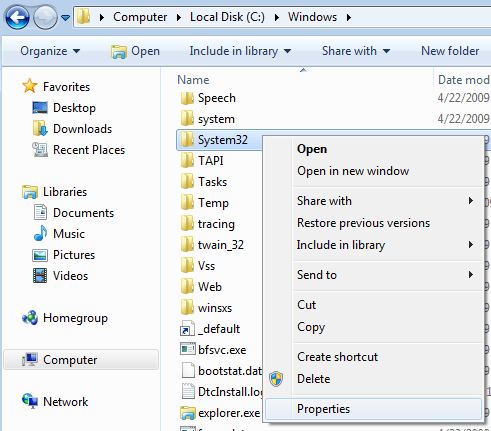
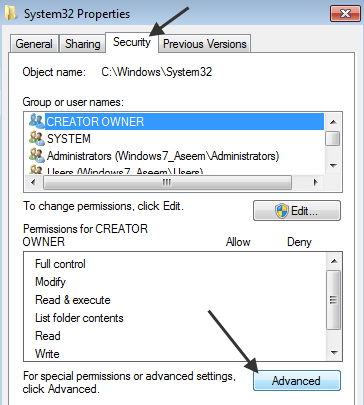
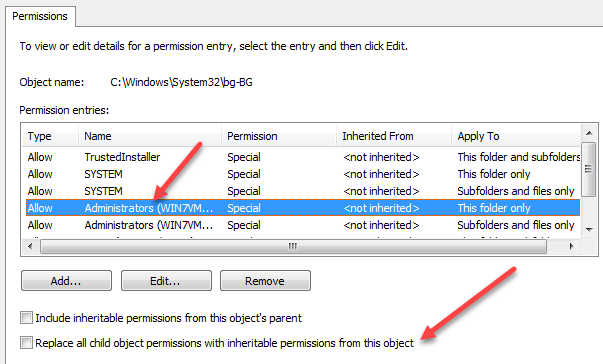
so right click file/folder choose properties > advanced > change permissions > check box that says ‘replace all child object permission with inheritable permissions from this object.’

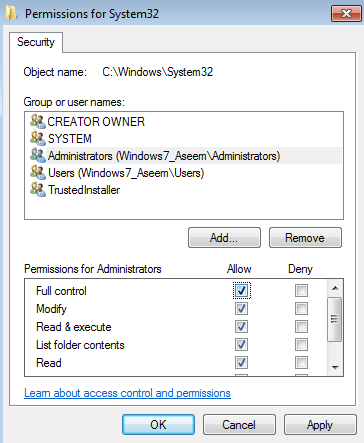
Also make your user account is set to full control. After that it should apply permissions to all subfolders and it should work. It took me forever to figure out but now I got it!

commenter
bobl61 Said,
May 10th, 2010 @4:26 pm  

Works a treat…if you’re having trouble, make sure you have applied the second step, or it will not work!

commenter
james Said,
May 17th, 2010 @4:16 pm  

Gracias, las instrucciones son claras y funciona.

commenter
Keilin Said,
May 20th, 2010 @12:45 pm  

Thank you, Aseem! I am also still having trouble though, it says I need permission. I am having compatibility issues with my all-in-one after upgrading to 7. It says “.NET Framework 2.0 is required to continue.” However, after re-downloading, it says 2.0 is already installed as part of the OS. I figured if I could delete then re-download .NET, I would be fine, so I tried this. But it is still telling me that I require permission from myself, the only person that uses this computer. If anyone could help with this, I would greatly appreciate it! I’m in Interior Design student and I can’t afford to keep paying to have my projects printed out at a store. Thanks!

commenter
Woody Said,
May 22nd, 2010 @7:37 pm  

can i take trustedinstaller off without messing up my system on windows 7. Also i seem to check folders with pictures in it and they are gone or at least some of them. I use kapersky antivirus and i hope its not a virus. i beleive it might be trustedinstaller? Any reply?

commenter
manny600 Said,
May 24th, 2010 @4:22 pm  

hey man i did everything u said and deleted some files but after i restart my pc all the files i deleted are back like nothin ever happen

commenter
BraveToast Said,
May 25th, 2010 @8:38 pm  

It seems for me that the 2nd step (changing admin to have full control) needs to be applied to all subfolders.. then I was able to delete them without being told I need permission from Admin.

commenter
Skyefyre Said,
May 30th, 2010 @10:03 am  

Thank you so much for posting this information. I have been trying to rewrite a simple windows file for weeks now but could not figure out how to get around this roadblock! With every new /facepalm I reconsider owning a Mac… lol

commenter
franc Said,
June 5th, 2010 @3:32 pm  

works – had to follow the same instructions for the containing folder – thanks

mygif
December 11th, 2009 @2:49 pm  
mygif
December 20th, 2009 @5:23 am  
Please Leave Your Comments Below

Please Note: All comments will be moderated