
Some people loved it and some people hated it. Wherever you land on that spectrum, Microsoft introduced us to the Sidebar in Windows Vista.
However, many users who upgraded to Windows 7 were surprised that the Sidebar was not a part of the Aero Desktop. Learn what happened to the Sidebar in Windows 7 and how to use your gadgets in Windows 7 without it.
The Windows Vista Sidebar
Introduced in Windows Vista, the Sidebar was a place where another new feature of the new operating system resided. Gadgets are small programs created from XML, HTML, and image files that you can place on the Sidebar in Windows Vista.

Unfortunately, many people did not find the sidebar or the gadgets that resided on it to be too useful. This was especially true because when Vista was released. Many home users did not have widescreen monitors and the Sidebar took up too much valuable real estate on the desktop.
Having the Sidebar disappear when not in use kind of defeated the purpose of having the gadgets on the desktop in the first place because they weren’t easily visible when needed.
Windows 7 and the Sidebar
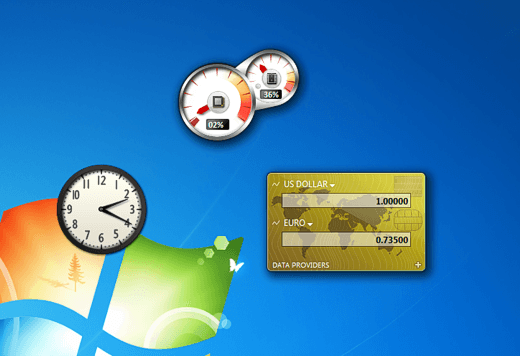
Recognizing that it wasn’t well received in Vista, Microsoft gave the Sidebar a major overhaul in Windows 7. Gadgets now reside on the desktop where users can float them anywhere on the screen, not unlike other windows such as Windows Explorer.

One reason for the overhaul was to make room for another new feature in Windows 7. As its name implies, Aero Snap is a feature of the Aero Desktop that allows users to snap windows and programs to the left and right of the screen by pulling the window to the outer edges. Pulling a window to the top of the screen allows the user to instantly maximize any window.
It is likely that the Sidebar, with its ability to auto-hide, would interfere with Aero Snap. Consequently, gadgets now reside anywhere the user wants as floatable objects rather than statically fastened to a special container.
The Sidebar Gadgets in Windows 7
Truthfully, Microsoft did not drop the Sidebar from Windows 7. It’s there, it just is no longer a static container. The gadgets you have on your computer reside in one of two folders. This one is for all users:
C:\Program Files\Windows Sidebar\Gadgets\
and this one is for each individual user of the computer:
C:\Users\<username>\AppData\Local\Microsoft\Windows Sidebar\Gadgets\
where <username> is the name of the individual Windows 7 account. Notice that in both cases, the gadgets reside in a Windows Sidebar folder.
How Does the Windows Sidebar Work in Windows 7?
As stated above, the Sidebar does exist in Windows 7; it just operates differently to make possible the Aero Snap feature. Placing gadgets on the desktop means having floating applications rather than having them confined to one special area.
However, if you place a gadget on the Windows 7 desktop, you can snap them to the sides and corners. In fact, you can line them up just as if they were in the Sidebar container like in Windows Vista and they will snap to each other as well.

Notice that if you line up your gadgets and snap them to the right hand side of the screen and to each other, you end up creating a virtual Sidebar just like in Windows Vista without the hassle of having them statically confined to a Sidebar container.
Not a major revelation, but given the power and popularity of the Aero Snap feature, losing the Sidebar container to how Windows 7 handles gadgets is an excellent trade-off. If you have your gadgets all setup and you don’t want to risk losing them, make sure to backup your Windows 7 gadgets for safety. If you don’t need them anymore, you can easily turn off gadgets in Windows 7 too. Enjoy!
