Skip to content
HELP 101010 DESK 010101 GEEK
  • How-To
  • Social Media
  • Streaming
  • Reviews
  • Newsletter
  • News

Subscribe to our Newsletter

Get troubleshooting tips, step-by-step guides, and the latest tech updates.

Sign in with Google

Explore

  • How-To
  • Social Media
  • Streaming
  • Reviews
  • Newsletter
  • News

About & help

  • About Us
  • Editorial Standards
  • Contact Us
  • Terms of Use
  • Privacy Policy
  • Advertise
0%
In this article
    1. Home/
    2. Social Media/
    3. Discord Keeps Disconnecting and Reconnecting? 15 Ways to Fix

    Discord Keeps Disconnecting and Reconnecting? 15 Ways to Fix

    Dilum Senevirathne
    November 1, 2022
    6 min read
    Share

    Help Desk Geek is reader-supported. We may earn a commission when you buy through links on our site. Learn more.

    Discord speaker purple lighting.

    Does Discord disconnect and reconnect unexpectedly during video games or voice chats? Don’t worry—we’ll explain why that happens and what you can do to fix the problem in Windows 10 and 11.

    The Discord app for Microsoft Windows can disconnect and reconnect for several reasons. Server-side issues, insufficient permissions, conflicting settings, etc., are all factors. Go through the solutions below to fix Discord disconnects and call drops on PC.

    Table of Contents

      1. Check the Discord Server Status

      It’s best to begin by confirming there’s nothing wrong with Discord on the server side. Just visit the Discord Status page and ensure all systems and voice servers are operational. If not, wait until Discord resolves the problem. It shouldn’t take long.

      Discord Keeps Disconnecting and Reconnecting? 15 Ways to Fix image 2

      2. Check Your Network Connection

      If Discord’s servers aren’t the problem, it could be that your network connection is slow. Perform an internet speed test with an online tool like Fast.com. If the upload, download, and latency readings don’t look good:

      • Restart your router or modem.
      • Disconnect from any virtual private networks (VPNs).
      • Switch from Wi-Fi to Ethernet, if possible.
      • Reset your router.
      • Update your network drivers.

      If the problem persists, continue troubleshooting the slow internet connection or contact your ISP (internet service provider).

      3. Update Discord to Its Latest Version

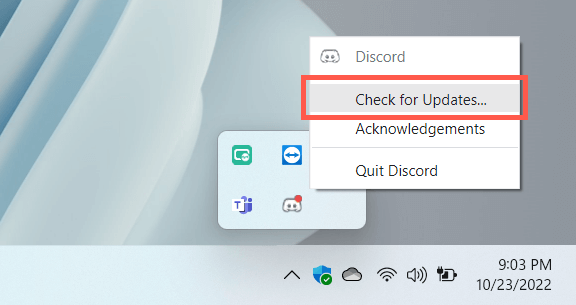
      Discord publishes frequent updates that address connectivity issues with the program. To install them, right-click the Discord icon on the system tray (bottom right of the screen) and select Check for Updates.
      Discord Keeps Disconnecting and Reconnecting? 15 Ways to Fix image 3

      4. Force-Quit and Relaunch Discord

      If there are no new updates, try force-quitting and relaunching Discord. To do that:

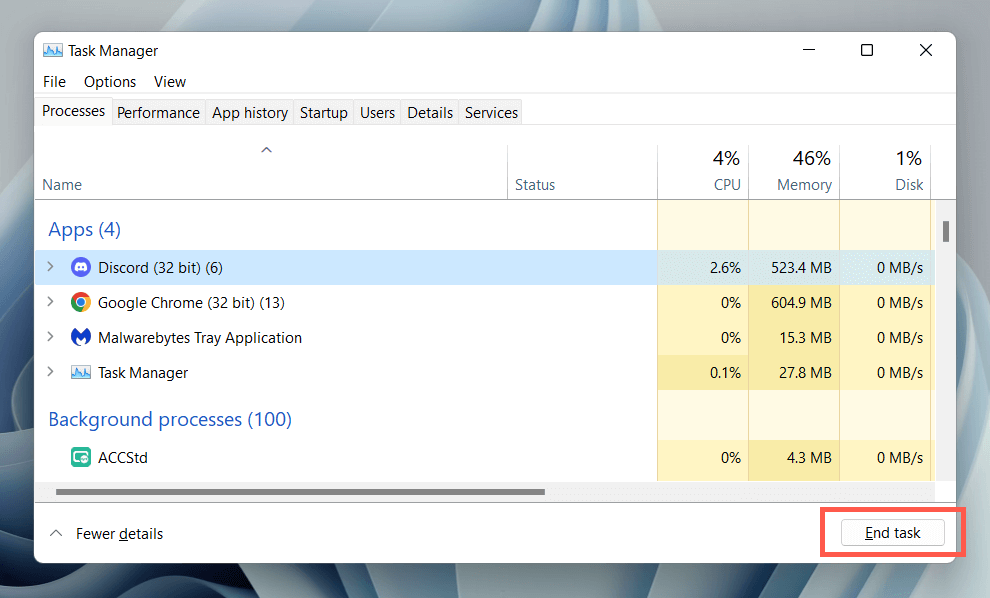
      1. Press Ctrl + Alt + Esc to open the Task Manager.
      2. Under the Processes tab, select Discord > End task.
      Discord Keeps Disconnecting and Reconnecting? 15 Ways to Fix image 4
      1. Re-launch Discord.

      5. Run Discord as an Administrator

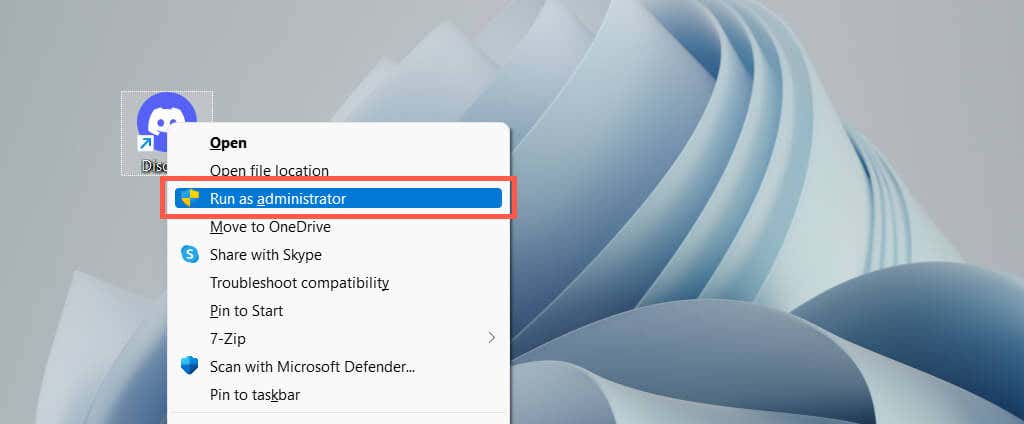
      Running Discord as an administrator effectively minimizes random disconnects while using it alongside various applications and video games. Just force-quit Discord again, search for Discord on the Start menu, and select Run as administrator.
      Discord Keeps Disconnecting and Reconnecting? 15 Ways to Fix image 5

      If that helps, learn how to always run Discord as an administrator.

      6. Reboot Your Computer

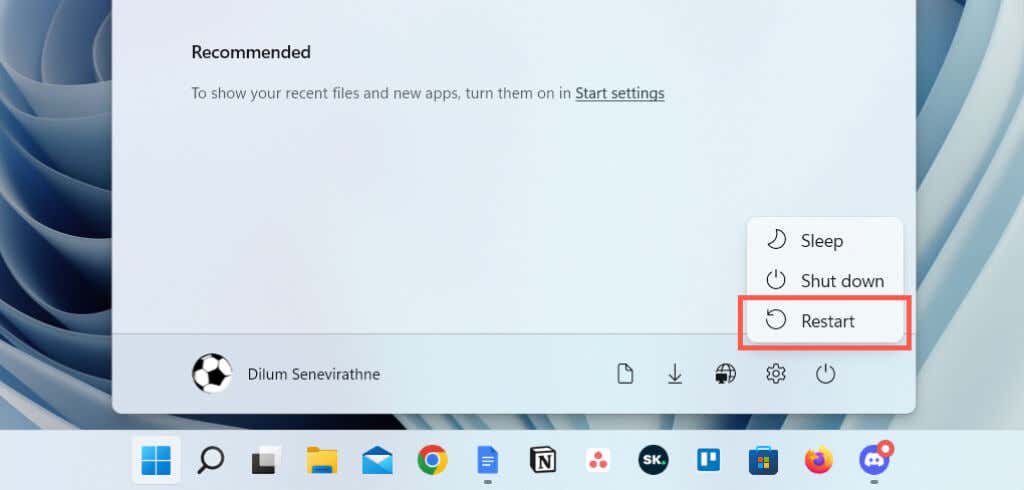
      If you rarely restart your computer, expect all sorts of problems to crop up in Windows and the applications that run on it. Open the Start menu and select Power > Restart if you haven’t already.
      Discord Keeps Disconnecting and Reconnecting? 15 Ways to Fix image 6

      7. Change the Call Server Region

      If Discord’s connectivity issues are limited to calls on a specific voice channel, check if switching server regions makes a difference. Assuming you have the administrative permissions required to do that:

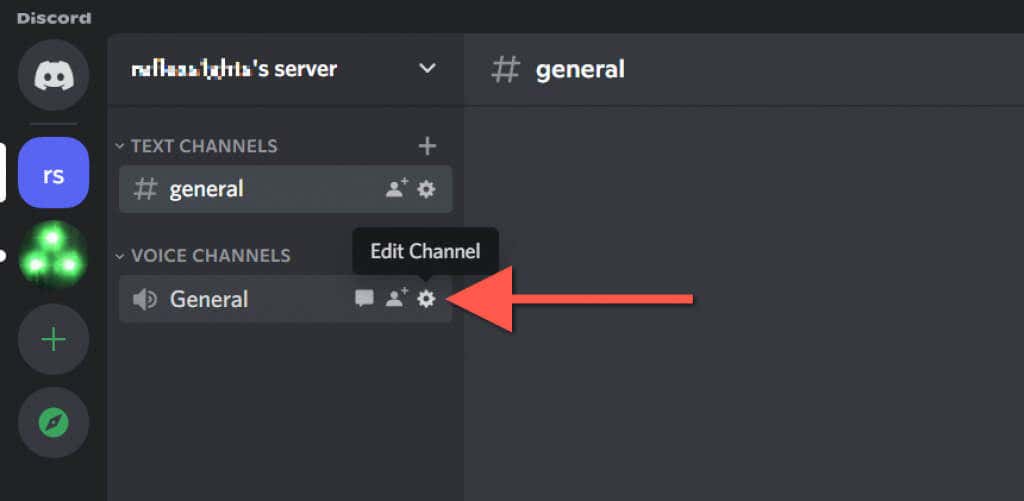
      1. Hover the cursor over the voice channel on the Discord sidebar.
      2. Select the gear-shaped Edit Channel icon.
      Discord Keeps Disconnecting and Reconnecting? 15 Ways to Fix image 7
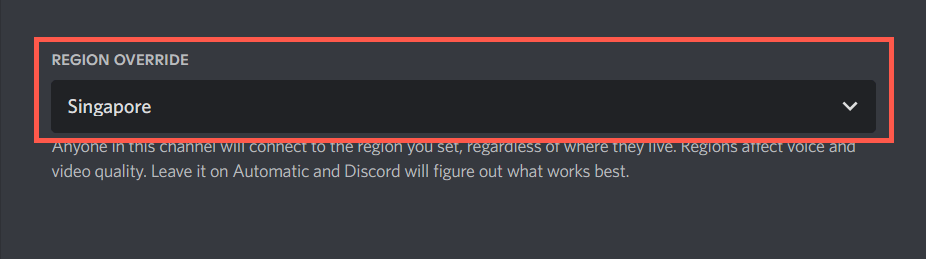
      1. Scroll down the Overview tab and select Region Override.
      2. Pick a server region on the drop-down menu.
      Discord Keeps Disconnecting and Reconnecting? 15 Ways to Fix image 8
      1. Select Save Changes.

      Learn what to do if voices sound robotic or distorted in Discord.

      8. Disable QoS High Packet Priority

      Discord has a feature that marks voice calls with a high priority, which means that your router then gives it preference over other forms of data. However, it doesn’t work well on some network configurations. To disable the feature:

      1. Select the Gear icon next to your Discord username at the bottom left corner of the window.

      Discord Keeps Disconnecting and Reconnecting? 15 Ways to Fix image 9
      1. Select Voice and Video on the left pane of the User Settings screen.
      2. Scroll down to the Advanced section and disable the switch next to Enable Quality of Service High Packet Priority.

      Discord Keeps Disconnecting and Reconnecting? 15 Ways to Fix image 10

      9. Clear the Discord Cache

      Discord saves various forms of temporary data in an offline cache to speed things up. Clear the relevant folder to rule out disconnection issues that stem from cache corruption.

      1. Force-quit Discord.
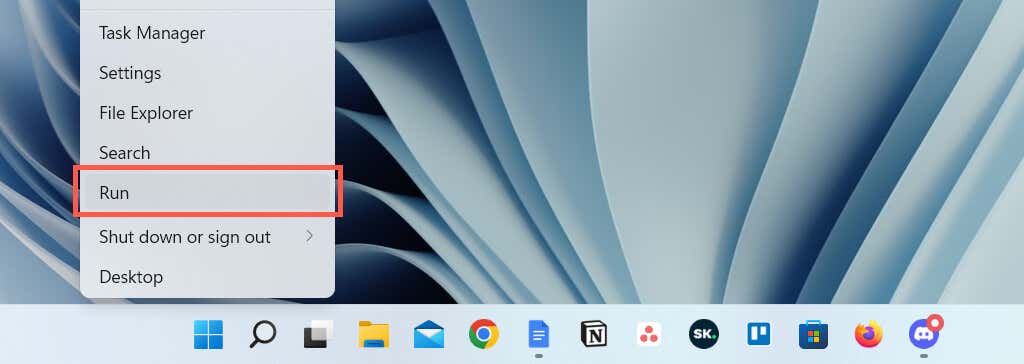
      2. Right-click the Start button and select Run.
      Discord Keeps Disconnecting and Reconnecting? 15 Ways to Fix image 11
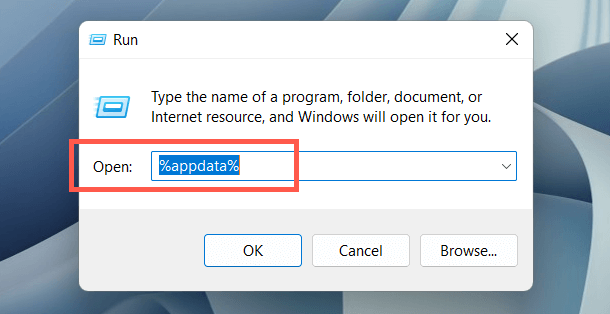
      1. Type %appdata% and select OK.
      Discord Keeps Disconnecting and Reconnecting? 15 Ways to Fix image 12
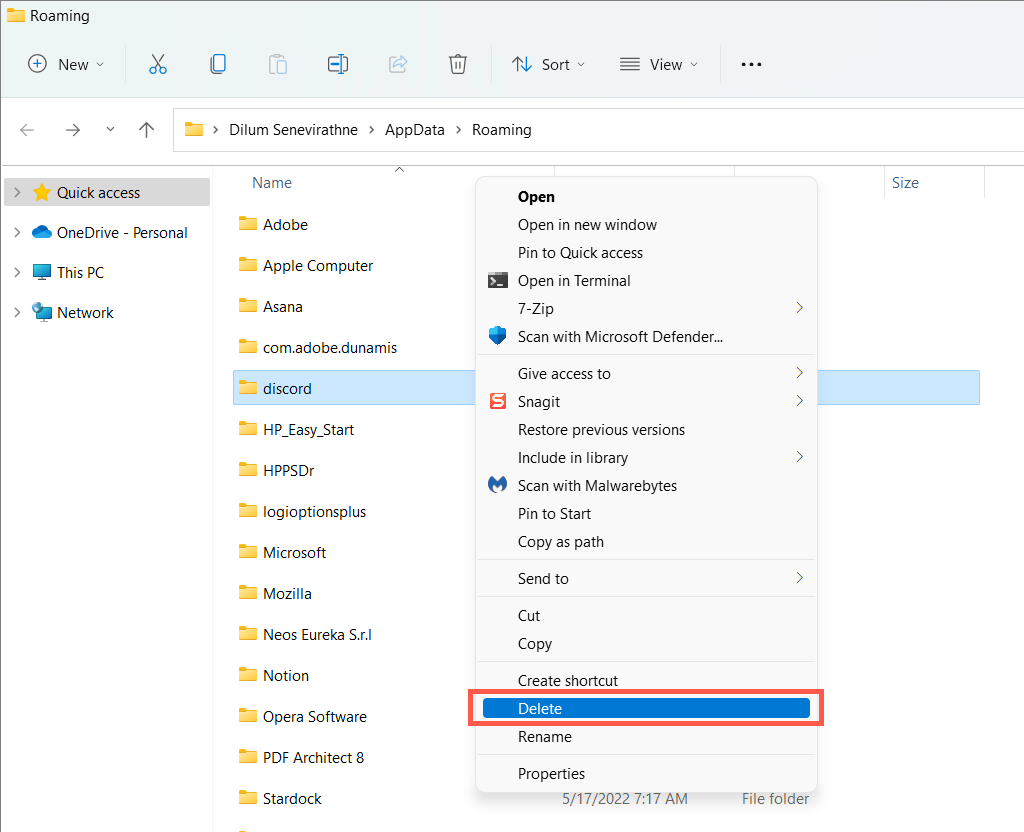
      1. Right-click the discord folder and select Delete.
      Discord Keeps Disconnecting and Reconnecting? 15 Ways to Fix image 13
      1. Re-launch Discord.

      10. Allow Discord on the Windows Firewall

      If Discord struggles to connect over a particular network, visit the Windows Defender Firewall and provide the application unrestricted access to the internet. To do that:

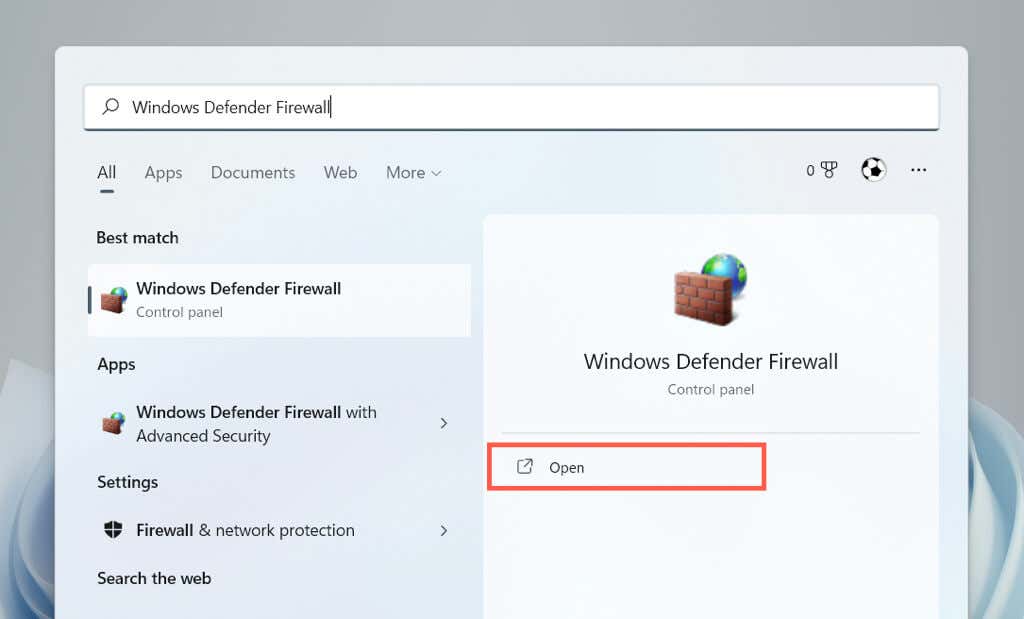
      1. Open the Start menu, search for Windows Defender Firewall, and select Open.
      Discord Keeps Disconnecting and Reconnecting? 15 Ways to Fix image 14
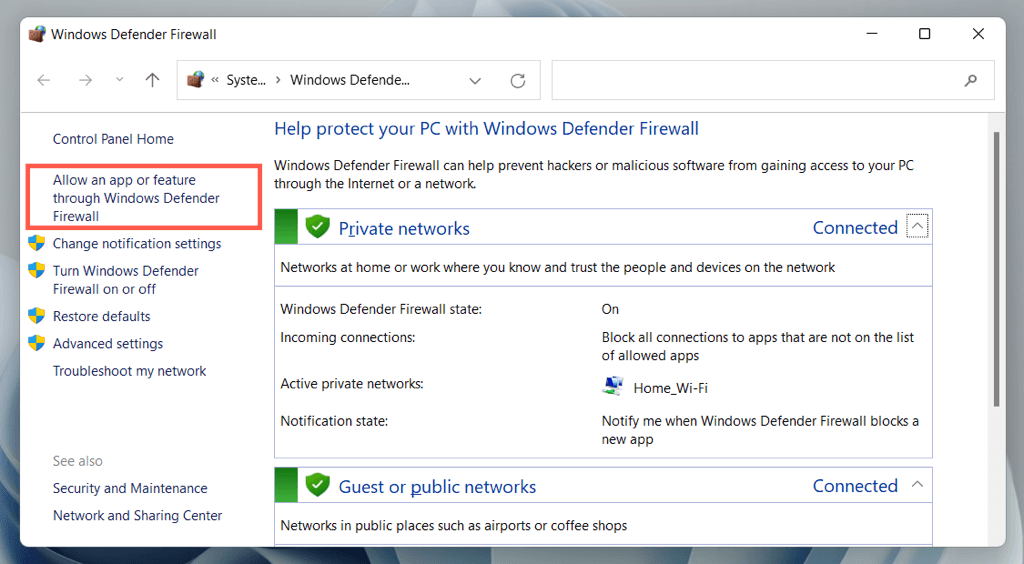
      1. Select Allow an app or features through Windows Defender Firewall on the left pane.
      Discord Keeps Disconnecting and Reconnecting? 15 Ways to Fix image 15
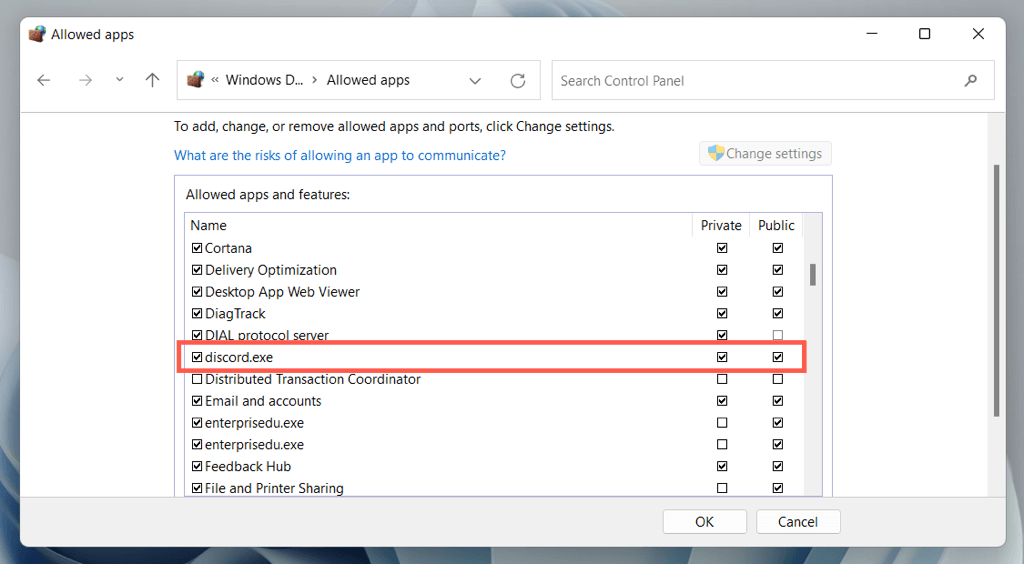
      1. Select Change settings.
      2. Locate discord.exe and check the boxes under the Private and Public columns.
      Discord Keeps Disconnecting and Reconnecting? 15 Ways to Fix image 16
      1. Select OK.

      11. Pause Anti-Virus Protection

      If you use a third-party antivirus program on your Windows computer, try pausing it briefly. If that helps, add Discord to the security utility’s allow list or firewall.

      12. Clear the DNS Cache

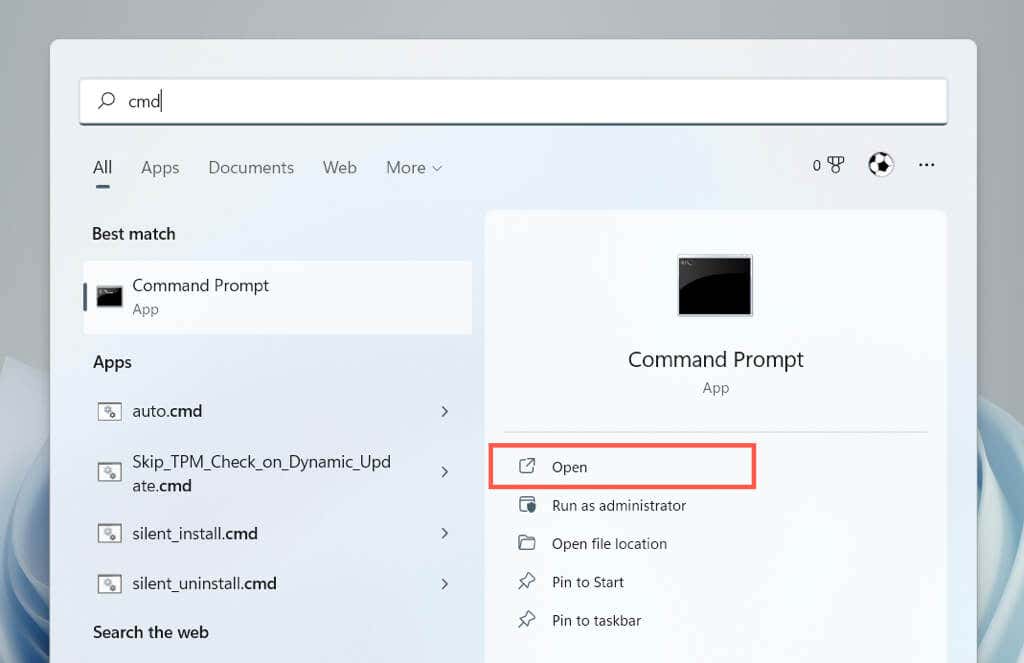
      An obsolete DNS (Domain Name System) cache in Windows could be behind Discord’s intermittent disconnects and reconnects. Clear the DNS cache via the Command Prompt console to resolve web addresses from scratch.

      1. Open the Start menu, type cmd, and select Run as administrator.
      Discord Keeps Disconnecting and Reconnecting? 15 Ways to Fix image 17
      1. Type the following command:

      ipconfig /flushdns

      Discord Keeps Disconnecting and Reconnecting? 15 Ways to Fix image 18
      1. Press Enter.

      13. Switch to Google Public DNS

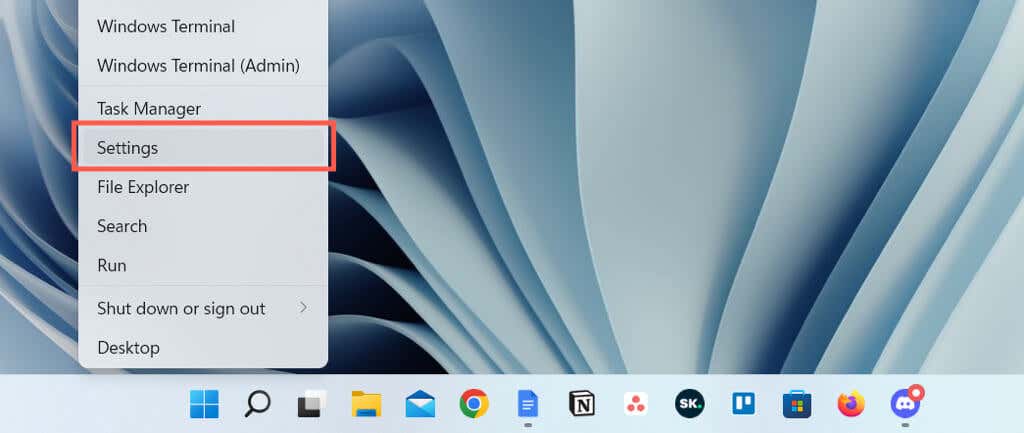
      Next, switch the Domain Name System for your network connection to Google DNS to increase Discord’s chances of locating the best servers. To do that:

      1. Right-click the Start button and select Settings.
      Discord Keeps Disconnecting and Reconnecting? 15 Ways to Fix image 19
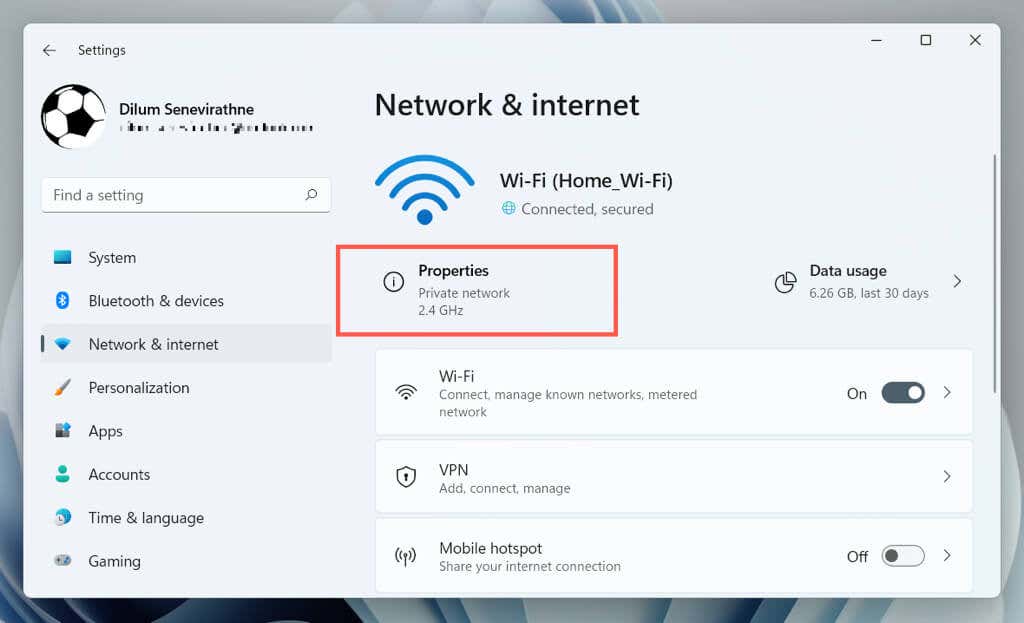
      1. Select Network & internet and choose Properties next to Wi-Fi or Ethernet.
      Discord Keeps Disconnecting and Reconnecting? 15 Ways to Fix image 20
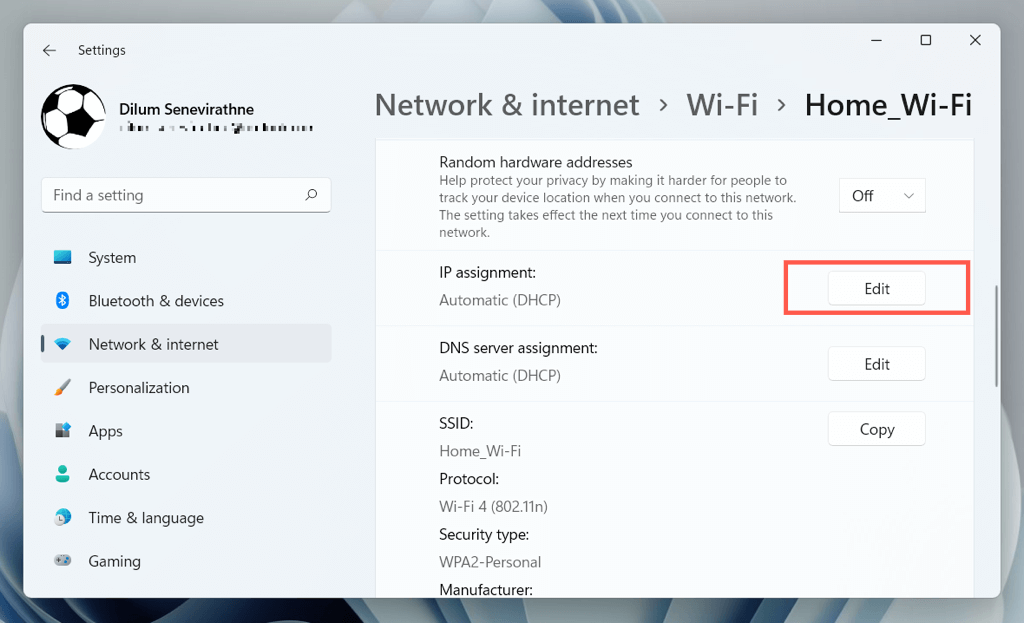
      1. Select Edit next to IP assignment.
      Discord Keeps Disconnecting and Reconnecting? 15 Ways to Fix image 21
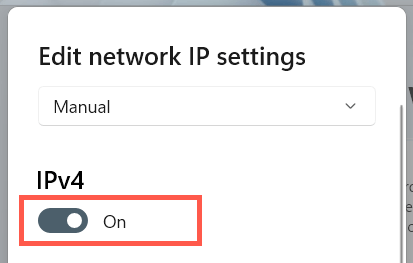
      1. Set Edit network IP settings to Manual and enable IPv4.
      Discord Keeps Disconnecting and Reconnecting? 15 Ways to Fix image 22
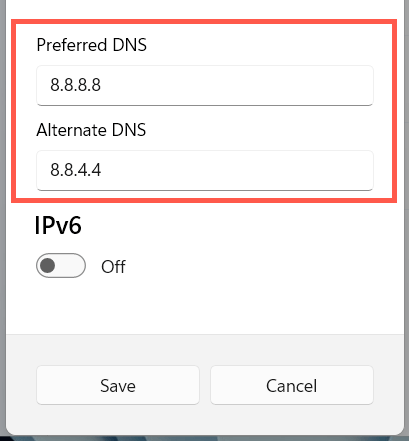
      1. Enter the following into the Primary DNS and Alternate DNS fields.

      8.8.8.8

      8.8.4.4
      Discord Keeps Disconnecting and Reconnecting? 15 Ways to Fix image 23
      1. Select Save.

      14. Reset the Network Settings in Windows

      Discord disconnects also tend to originate from a broken network configuration in Windows. To reset it:

      1. Open the Windows Settings app and select Network & internet > Advanced network settings.
      Discord Keeps Disconnecting and Reconnecting? 15 Ways to Fix image 24
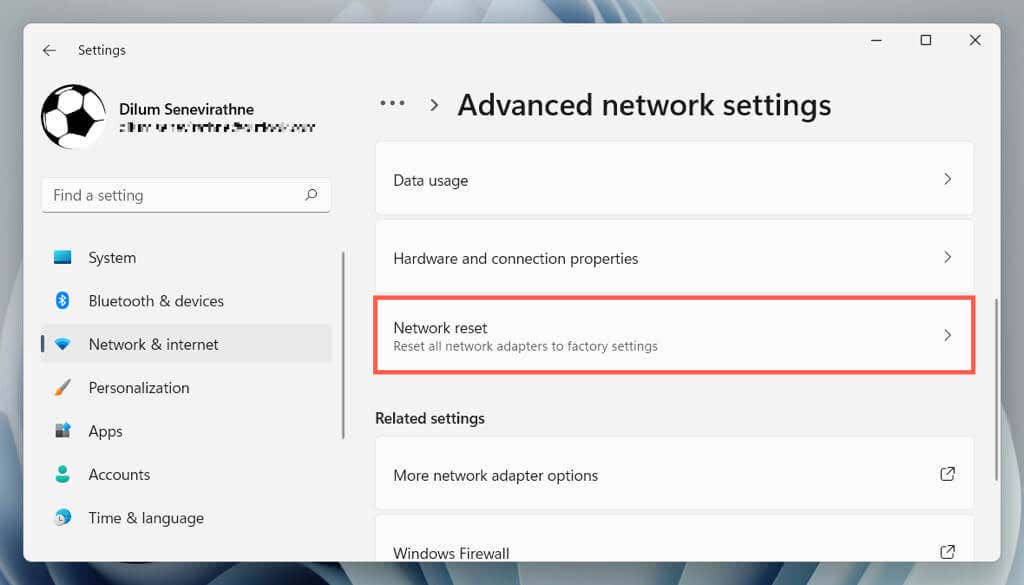
      1. Select Network reset.
      Discord Keeps Disconnecting and Reconnecting? 15 Ways to Fix image 25
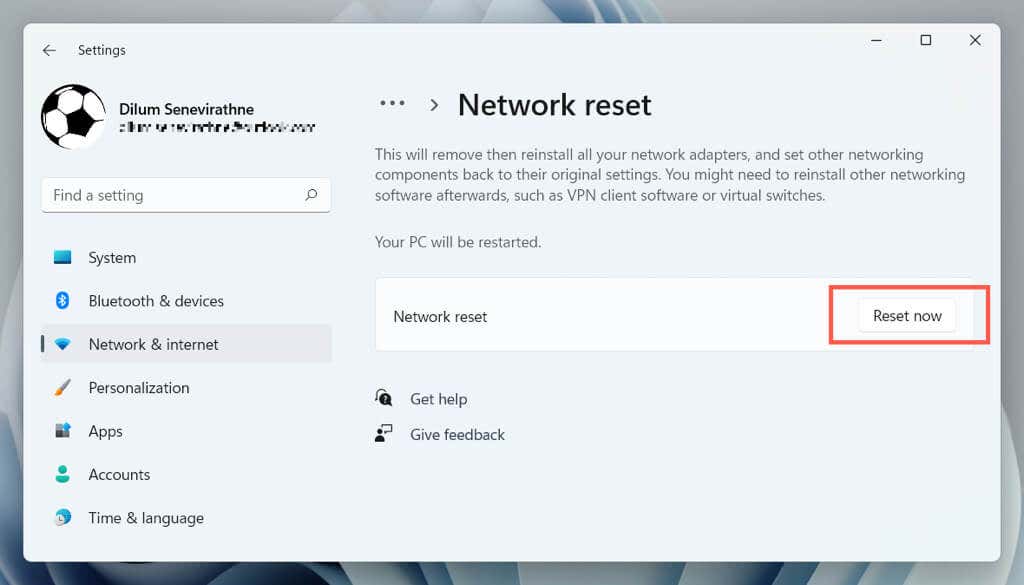
      1. Select Reset now.
      Discord Keeps Disconnecting and Reconnecting? 15 Ways to Fix image 26

      The reset procedure will restart Windows and reinstall all network drivers and Wi-Fi/Ethernet adapters. You must rejoin any Wi-Fi networks manually after the reset.

      15. Remove and Reinstall Discord

      If Discord keeps disconnecting and none of the above fixes are helpful, it’s time to remove and reinstall the program.

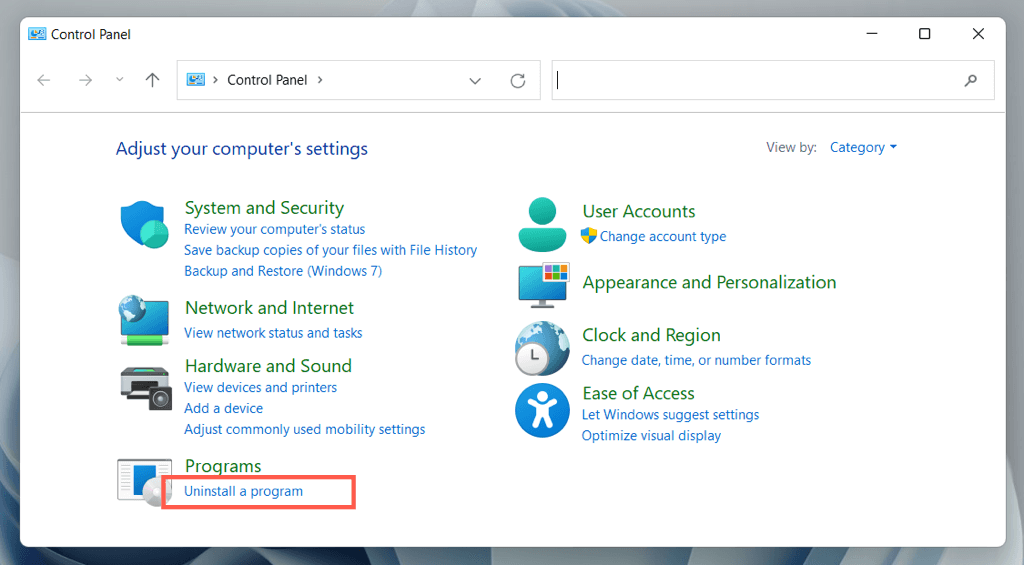
      1. Open the Start menu, search for the Control Panel, and select Open.
      Discord Keeps Disconnecting and Reconnecting? 15 Ways to Fix image 27
      1. Select Uninstall a program.
      Discord Keeps Disconnecting and Reconnecting? 15 Ways to Fix image 28
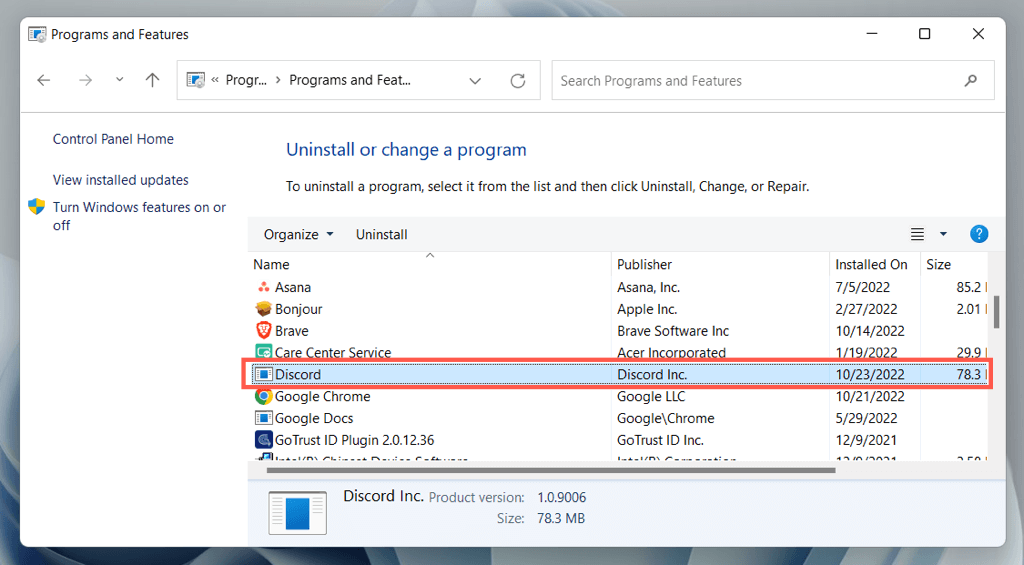
      1. Double-click Discord to uninstall it.
      Discord Keeps Disconnecting and Reconnecting? 15 Ways to Fix image 29
      1. Download the latest Discord installer.
      2. Reinstall Discord and sign back in with your Discord account credentials.

      Restore Stable Discord Connectivity Again

      Discord connection problems can be annoying to troubleshoot since it’s often hard to identify their exact cause. However, take your time to work on the fixes above, and you should experience stable Discord connectivity again. Contact Discord Support if you need extra help.

      Tags: Discord

      Was this helpful? Share it.

      Send it to someone who is stuck on the same thing, or post it.

      MessagesWhatsAppEmailXFacebookLinkedInRedditBlueskyTelegramThreads
      Written by

      Dilum Senevirathne

      Dilum Senevirathne is a freelance tech writer and blogger with three years of experience writing for online technology publications. He specializes in topics related to iOS, iPadOS, macOS, and Google web apps. When he isn't hammering away at his Magic Keyboard, you can catch him binge-watching productivity hacks on YouTube. Read Dilum's Full Bio

      View Dilum's Profile

      Recent Posts

      • Laptop on a desk with video thumbnails flowing into a download folder, illustrating saving YouTube videos for offline viewing
        How to Download YouTube Videos With 4K Video Downloader PlusOct 7, 2026
      • Is 3D Pinball Coming Back to Windows 11? What Microsoft's Windows Chief Actually Said
        Is 3D Pinball Coming Back to Windows 11? What Microsoft’s Windows Chief Actually SaidOct 7, 2026
      • How to Fix the BitLocker Recovery Screen After a Windows Update
        How to Fix the BitLocker Recovery Screen After a Windows UpdateOct 7, 2026
      • How to Remove Adware Injected by a Chrome Extension in Windows 11
        How to Remove Adware Injected by a Chrome Extension in Windows 11Oct 6, 2026

      Ready for the best newsletter in tech?

      Get daily tips, tricks, guides, and special offers delivered right to your inbox.

      Thanks! Check your inbox for the next issue.

      Search

      Categories

      • Announcements (1)
      • Gaming (51)
      • How-To (2,930)
      • News (20)
      • Reviews (294)
      • Social Media (96)
      • Streaming (37)

      Popular Tags

      Adobe Amazon Android Antivirus Buying Guides Chrome Chromebook Discord Explainer Facebook Firefox Gadget Reviews Google Google Docs Google Drive Hardware Home Networking Internet iPhone Linux macOS Microsoft Excel Microsoft Office Microsoft OneNote Microsoft Outlook Microsoft PowerPoint Microsoft Surface Microsoft Teams Microsoft Word OneDrive Printers Roundups Software Reviews Steam Ubuntu Virtualization WhatsApp WiFi Windows 7 Windows 8 Windows 10 Windows 11 Windows XP Wordpress YouTube

      Our Publishing Family

      Help Desk Geek is part of the AK Internet Consulting publishing family.

      • ONLINE TECH TIPS
      • THE BACK ROOM TECH
      • SWITCHING TO MAC
      • XBOX ADVISOR

      Daily Email Newsletter

      CONNECT WITH US

      About Help Desk Geek

      Help Desk Geek has published practical troubleshooting guides, Windows and Office tutorials, and hardware fixes since 2009 — helping millions of readers solve tech problems and get more from their devices.

      Learn More →

      Advertise →

      © 2009-2026 Help Desk Geek.com, LLC.
      All Rights Reserved.

      • Home
      • About Us
      • Editorial Standards
      • Contact Us
      • Terms of Use
      • Privacy Policy
      • Advertise
      Online

      Share this article

      Discord Keeps Disconnecting and Reconnecting? 15 Ways to Fix

      Send to someone

      MessagesWhatsAppEmail

      Post on

      XFacebookLinkedInRedditBlueskyTelegramThreads
      Tired of Googling Tech Problems?

      Tired of Googling Tech Problems?

      Get step-by-step fixes from Help Desk Geek so the answer is already in your inbox next time.

      By signing up, you agree to the Terms of Service and Privacy Policy.

      Stay tuned for our step-by-step fixes, actionable guides, tech how-tos, and clear, practical advice for real-world problems.

      Thank you for subscribing!

      Stay tuned for our step-by-step fixes, actionable guides, tech how-tos, and clear, practical advice for real-world problems.