

The first rule of fight club academic writing is to cite your sources. (Honestly, we wish it were more common in other kinds of writing, too.) Two common styles for academic writing are the MLA and APA.
Both offer guidance on how to clearly document and format references to other works like books, articles, and websites. Moreover, both have clearly defined rules for how to cite YouTube videos in particular.
The MLA Handbook is published by the Modern Language Association of America (MLA) and is most commonly used for academic writing in the humanities. The current version of the handbook is the eighth edition which was issued back in 2016. Style manual aficionados can rejoice, though, because the ninth edition is due out in April 2021!
Instead of following MLA rules, academic writers in the social and behavioral science fields more commonly use the APA style from the American Psychological Association (APA).
The APA’s current style manual is The Publication Manual of the American Psychological Association, Seventh Edition. Just like the MLA, the APA has rules about how to cite YouTube videos in a scholarly article. We’ll cover both styles below.
How to Cite a YouTube Video in MLA
The MLA provides a template of the core elements found in citations. Most sources have common attributes, like an author, a title, and a date of publication. The MLA template of core elements lists those elements in a certain order, and that’s how you determine which elements to list in a citation and in what order.
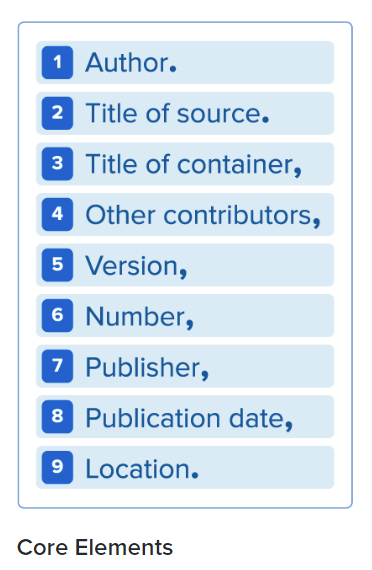
Step-by-Step Instructions for Citing a YouTube Video in MLA
An MLA citation of a YouTube video will include the following information in this order:
- The video’s creator in the format LastName, FirstName (omit this if it’s the same as the uploader in step 4), followed by a period.
- “The title of the video.” (Note the quotes and period.)
- The platform—in this case, YouTube, (be sure to use italics and follow it with a comma).
- The YouTube channel or user who uploaded the video followed by a comma.
- The upload date in the format DD Mo. YYYY, followed by a comma.
- The URL (do not include the http://), ending with a period.
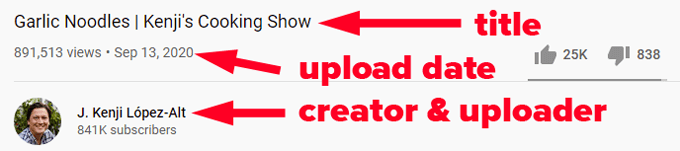
For YouTube videos that were uploaded by the creator, a citation could look like this:
“Garlic Noodles | Kenji’s Cooking Show.” YouTube, uploaded by J. Kenji López-Alt, 13 Sep 2020, www.youtube.com/watch?v=wK9OHVxB_Z8.
Here’s another example:
“Mars rover begins search for alien life on Red Planet – BBC News.” YouTube, uploaded by BBC News, 18 Feb 2021, www.youtube.com/watch?v=E00731OeWCA.

What if the video was uploaded by someone different than the video’s creator? Here’s an example of a citation where the uploader and creator are not the same.
Kuwahata, Ru and Porter, Max. “Negative Space | Oscar Nominated Stop-Motion Animation | Short of the Week.” YouTube, uploaded by Short of the Week, 16 Jul 2019, www.youtube.com/watch?v=KI2lsdXJQ40.
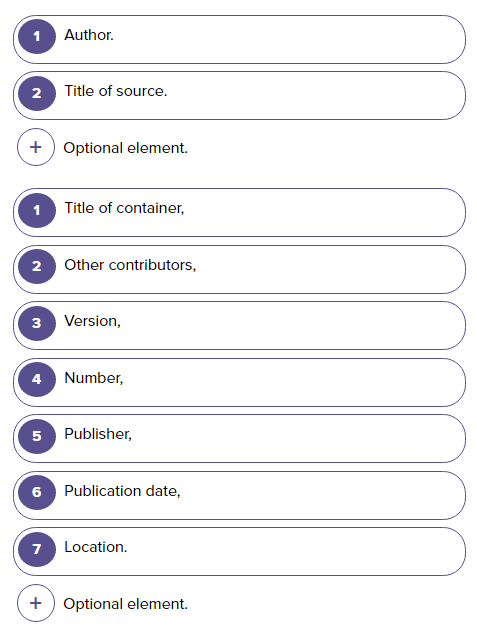
Conveniently, the MLA provides an interactive practice template to help you get your citations right. While they say the template “is not a citation generator,” it should be good enough to help you to create a citation which you can then double-check against the MLA Handbook.
How to Cite a YouTube Video in APA
The APA follows slightly different formatting for citing YouTube videos, and depending on the video you want to cite, you might have to do a little extra research.

Step-by-Step Instructions for Citing a YouTube Video in APA
An APA citation of a YouTube video will include the following information in this order:
- The uploader/creator’s real name, last name first, followed by a period, e.g., “López-Alt, Kenji.” You may have to visit the creator’s profile page to determine their real name. If you cannot find their real name, skip to step 2.
If the uploader is not the creator, then do some research and try to find the same video uploaded by the creator somewhere else, like on the creator’s YouTube channel, and cite that video instead.

- The uploader’s screen name in brackets, followed by a period, e.g., “[Kenji López-Alt].”
- The date the video was posted in parentheses, followed by a period, e.g., “(yyyy, Month dd).”
- The title of the video in italics. Only capitalize the first word and any proper nouns, and do not put a period after the title.
- The type of file in brackets, followed by a period, e.g., “[Video].”
- The website name, followed by a period, e.g., “YouTube.”
- The URL, e.g., “http://www.youtube.com/watch?v=wK9OHVxB_Z8”
Note: APA style requires that you indent all lines after the first line in your citation.
So, here’s what the citation could look like in APA style with the author’s real name and screen name:
López-Alt, Kenji. [Kenji López-Alt.] 2020, September 13. Garlic noodles | Kenji’s Cooking Show [Video]. YouTube.
www.youtube.com/watch?v=wK9OHVxB_Z8.
A YouTube citation where the uploader/creator is an organization might look like this:
BBC News. 2021, February 18. Mars rover begins search for alien life on Red Planet – BBC News [Video]. YouTube.
www.youtube.com/watch?v=E00731OeWCA.
If you want to cite an entire YouTube channel in APA style, follow this example:
López-Alt, K. (n.d.). Home [YouTube channel]. YouTube. Retrieved February 20, 2021, from https://www.youtube.com/user/kenjialt
López-Alt, K. (n.d.). Playlists [YouTube channel]. YouTube. Retrieved February 20, 2021, from https://www.youtube.com/c/JKenjiLopezAlt/playlists
The “n.d.” in the examples above stands for “no date,“ since YouTube channels don’t have a specific date attached to them and the content of the channel will likely change as time goes by.
Argh, It’s Too Confusing!
Properly recording and formatting citations can be a beast of a job, and sometimes the proper format isn’t obvious for the source you want to cite.
Luckily, there are reference management tools to help you, and almost all modern word processors have built-in functionality to automatically format bibliographies. Once you get a few citations under your belt, your confidence will increase, and you’ll be citing YouTube sources in your sleep!
