Skip to content
HELP 101010 DESK 010101 GEEK
  • How-To
  • Social Media
  • Streaming
  • Reviews
  • Newsletter
  • News

Subscribe to our Newsletter

Get troubleshooting tips, step-by-step guides, and the latest tech updates.

Sign in with Google

Explore

  • How-To
  • Social Media
  • Streaming
  • Reviews
  • Newsletter
  • News

About & help

  • About Us
  • Editorial Standards
  • Contact Us
  • Terms of Use
  • Privacy Policy
  • Advertise
0%
In this article
    1. Home/
    2. Social Media/
    3. What to Do If You Forget Your WhatsApp Password

    What to Do If You Forget Your WhatsApp Password

    Jake Harfield
    April 8, 2022
    3 min read
    Share

    Help Desk Geek is reader-supported. We may earn a commission when you buy through links on our site. Learn more.

    WhatsApp is a free messaging app owned by the social media company Facebook (Meta). It’s one of the most popular messaging apps worldwide and has over 2 billion active users. WhatsApp has a list of features that set it above the competition, but what happens if you forget your password?

    Depending on the security measures you have set up, resetting your WhatsApp PIN is relatively pain-free. In this article, we’ll cover what to do if you forget your WhatsApp password.

    Table of Contents

      Reset WhatsApp Two-Step Verification PIN

      Two-step verification is one of the new features that WhatsApp has added to improve user security. This is a welcome feature for any social networking app as it helps to reduce the chance that another user will steal your identity. 

      If you set up your WhatsApp account with two-step verification and provided your email address, you can reset your PIN straight away by requesting a reset link via the website or app.

      This process is the same whether you use WhatsApp on an Android device, iPhone, Microsoft PC, iPad or Mac.

      To reset your password:

      1. Open WhatsApp.
      2. Tap Forgot PIN?
      3. Tap Send Email.
      4. Open the email and tap the reset link.
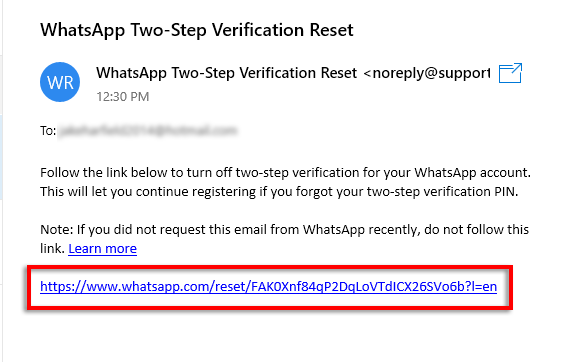
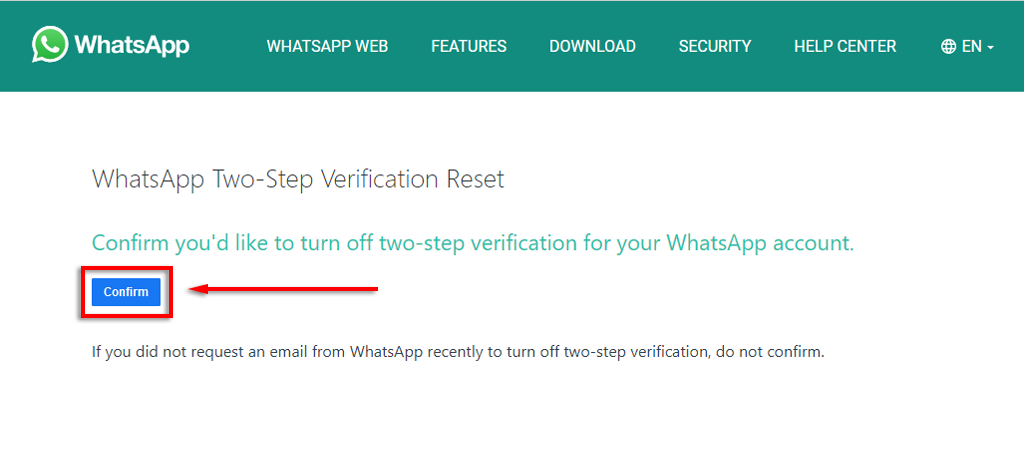
      1. When the browser opens, tap Confirm.

      This will disable WhatsApp two-step verification password so that you can access the app. This means that if you want to continue receiving the security benefits of two-factor authentication, you’ll need to re-enable it by providing a new passcode and email ID.

      Note: Your 2-step verification code is different to the 6-digit registration passcode that you received by SMS when you signed up for the app.

      Reset WhatsApp Pin With Forgotten Email Address

      If you didn’t provide an email address or you’ve forgotten/lost access to it, you’ll have to wait 7 days for your phone number to be verified again with WhatsApp. After this time, all pending WhatsApp messages will be deleted.

      If your number is reverified after 30 days of not using WhatsApp, a new account is created to replace your old one, meaning your WhatsApp chat history will be wiped.

      After the 7-day period has passed, open WhatsApp and tap Forgot PIN? > Reset.
      Unfortunately, WhatsApp makes it impossible to speed up this process. Trying to reinstall on a new device or register with the same mobile number will result in you being locked out of the app.

      Reset Your WhatsApp Encrypted Backup Password

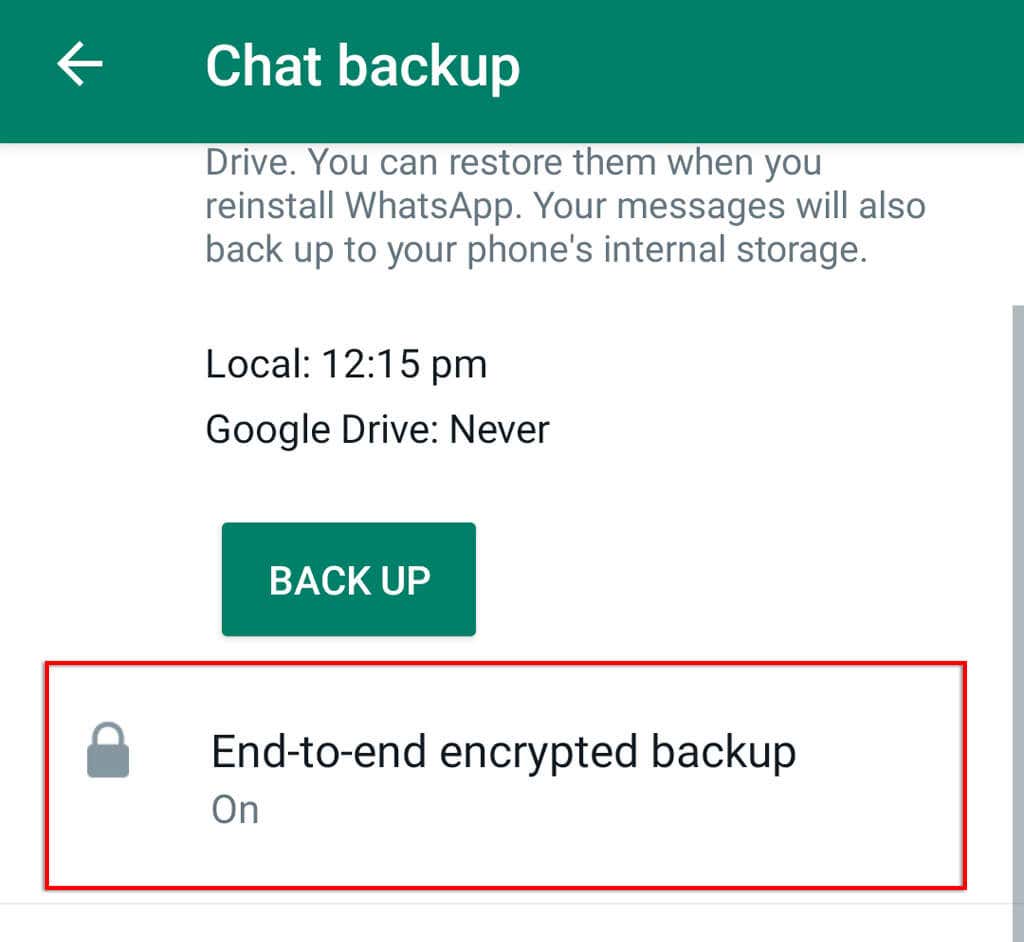
      WhatsApp provides users with the option to enable end-to-end encrypted backup so that nobody in between (including the app itself) can access your messages. 

      If you have enabled the 64-digit encrypted backup, resetting your password is easy as long as you remember your two-step PIN.

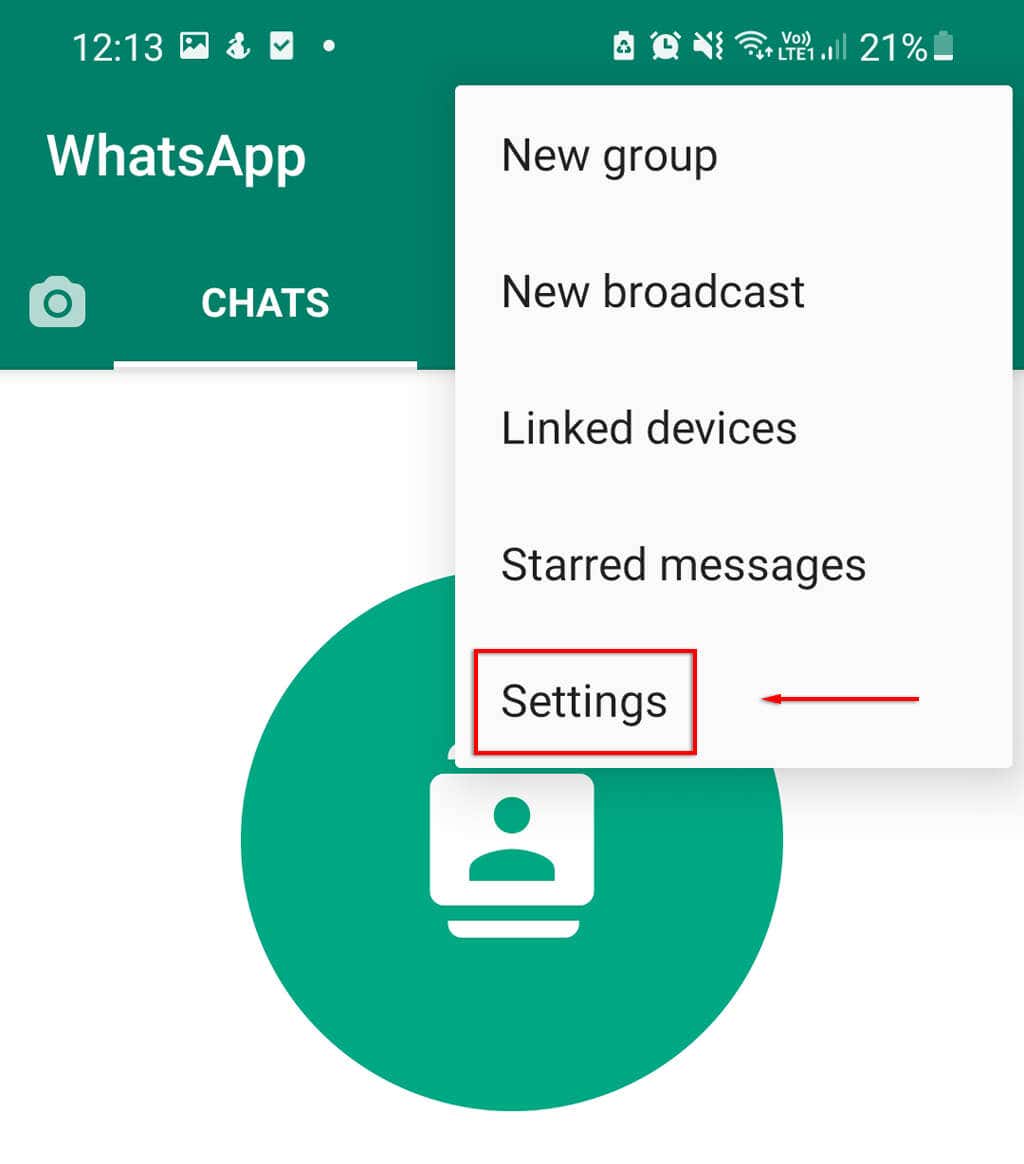
      1. Open WhatsApp and tap Settings.
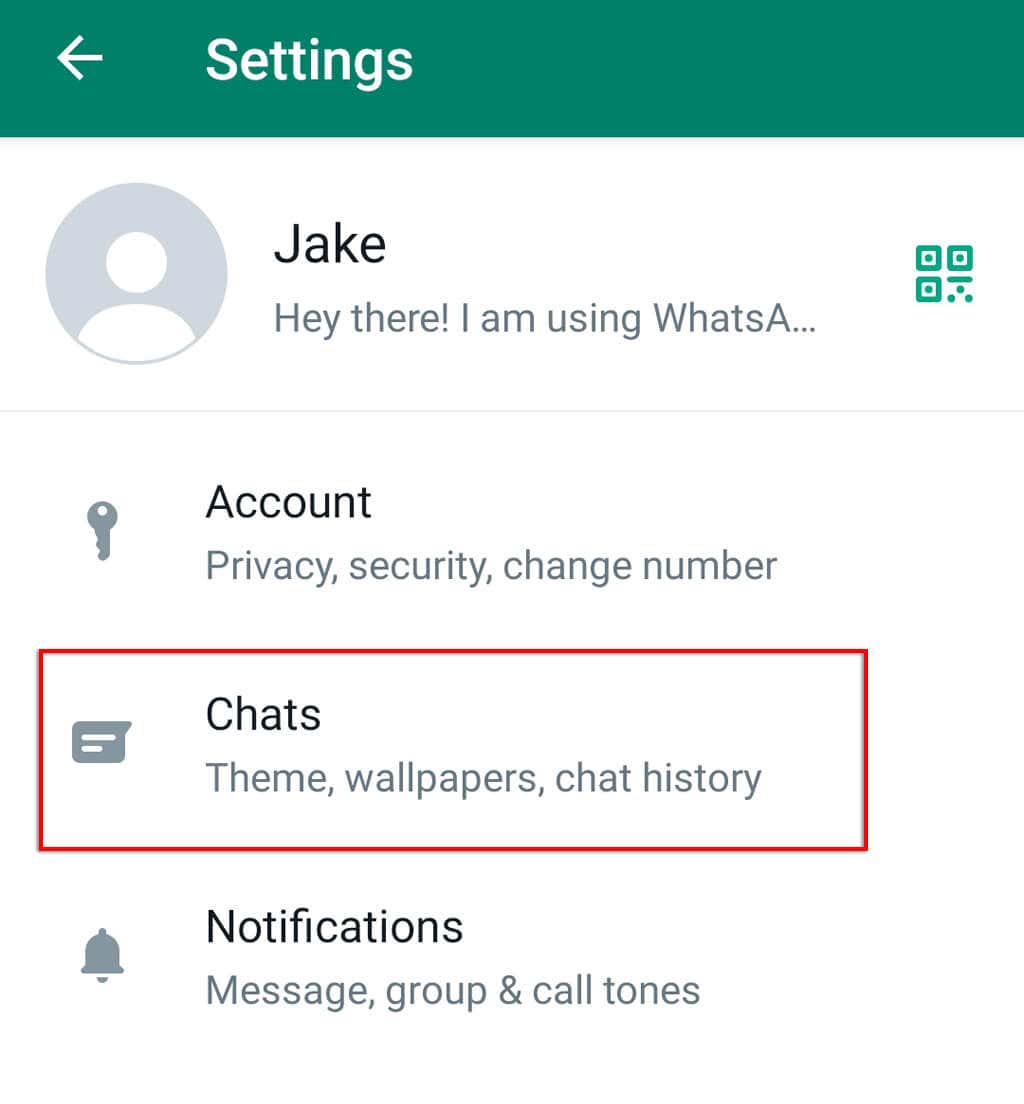
      1. Tap Chats.
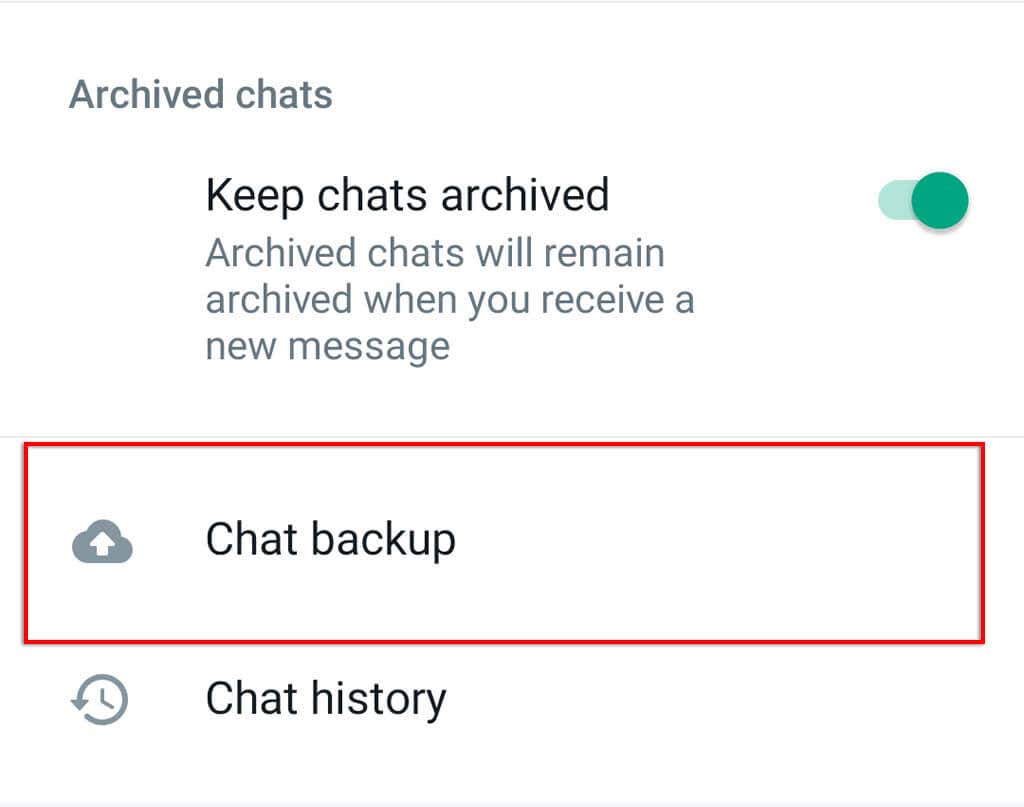
      1. Click Chat Backup.
      1. Tap End-to-end encrypted backup.
      1. Tap Change Password.
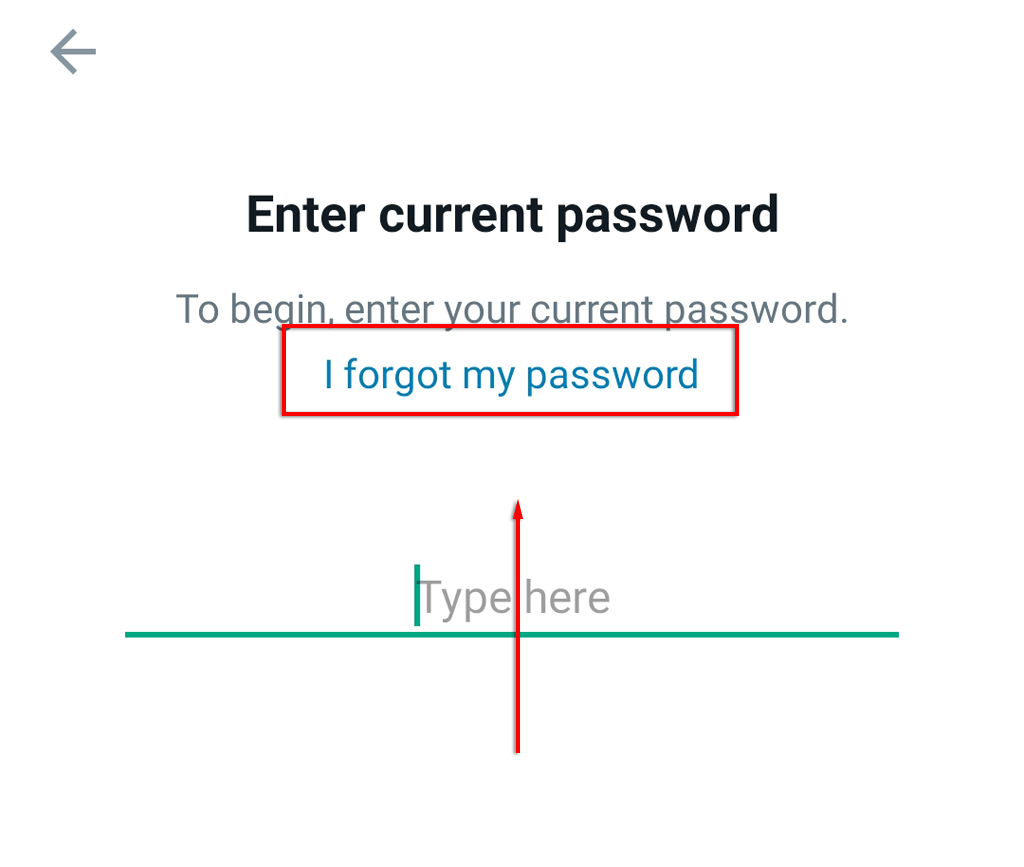
      1. Tap I forgot my password.
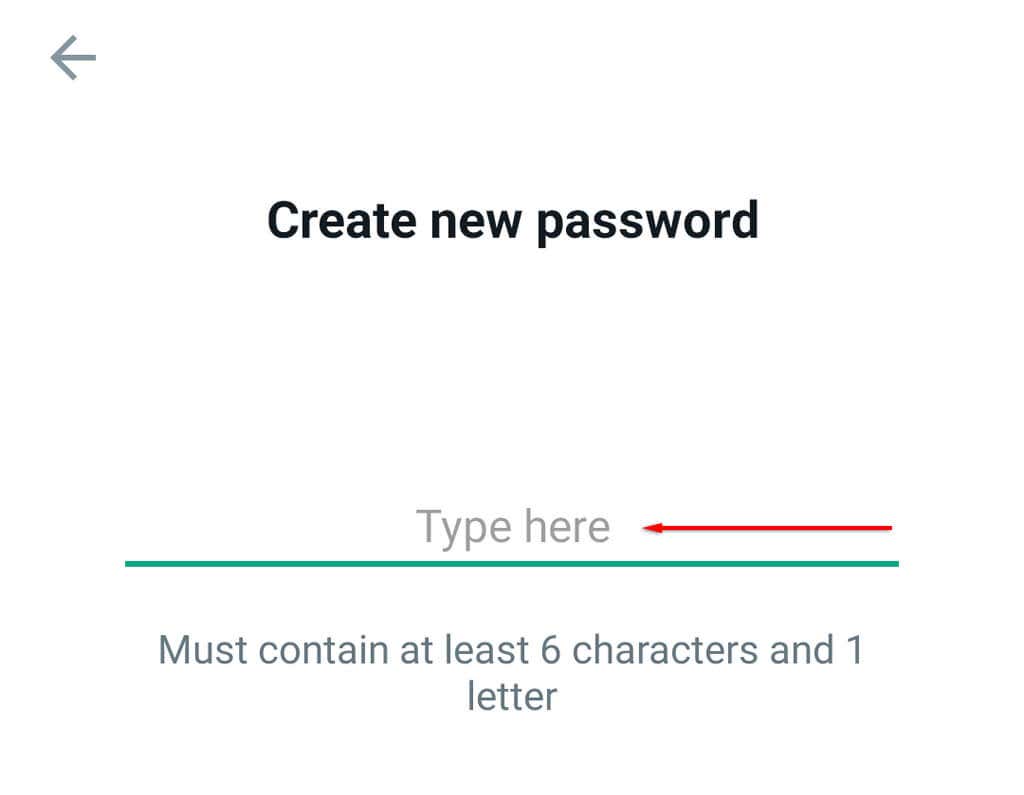
      1. Verify your identity using your fingerprint or two-factor PIN then type your new password.
      Back to the Conversation

      There’s nothing worse than being locked out of WhatsApp in the middle of a conversation. With so many apps requiring logins, it’s easy to forget your WhatsApp pin. Now you know what to do when you forget your WhatsApp account password, whether you use an Android phone or an Apple iOS device.

      Tags: WhatsApp

      Was this helpful? Share it.

      Send it to someone who is stuck on the same thing, or post it.

      MessagesWhatsAppEmailXFacebookLinkedInRedditBlueskyTelegramThreads
      Written by

      Jake Harfield

      Jake Harfield is an Australian freelance writer whose passion is finding out how different technologies work. He has written for several online publications, focusing on explaining what he has learned to help others with their tech problems. He’s an avid hiker and birder, and in his spare time you’ll find him in the Aussie bush listening to the birdsong. Read Jake's Full Bio

      View Jake's Profile

      Recent Posts

      • Laptop on a desk with video thumbnails flowing into a download folder, illustrating saving YouTube videos for offline viewing
        How to Download YouTube Videos With 4K Video Downloader PlusOct 7, 2026
      • Is 3D Pinball Coming Back to Windows 11? What Microsoft's Windows Chief Actually Said
        Is 3D Pinball Coming Back to Windows 11? What Microsoft’s Windows Chief Actually SaidOct 7, 2026
      • How to Fix the BitLocker Recovery Screen After a Windows Update
        How to Fix the BitLocker Recovery Screen After a Windows UpdateOct 7, 2026
      • How to Remove Adware Injected by a Chrome Extension in Windows 11
        How to Remove Adware Injected by a Chrome Extension in Windows 11Oct 6, 2026

      Ready for the best newsletter in tech?

      Get daily tips, tricks, guides, and special offers delivered right to your inbox.

      Thanks! Check your inbox for the next issue.

      Search

      Categories

      • Announcements (1)
      • Gaming (51)
      • How-To (2,930)
      • News (20)
      • Reviews (294)
      • Social Media (96)
      • Streaming (37)

      Popular Tags

      Adobe Amazon Android Antivirus Buying Guides Chrome Chromebook Discord Explainer Facebook Firefox Gadget Reviews Google Google Docs Google Drive Hardware Home Networking Internet iPhone Linux macOS Microsoft Excel Microsoft Office Microsoft OneNote Microsoft Outlook Microsoft PowerPoint Microsoft Surface Microsoft Teams Microsoft Word OneDrive Printers Roundups Software Reviews Steam Ubuntu Virtualization WhatsApp WiFi Windows 7 Windows 8 Windows 10 Windows 11 Windows XP Wordpress YouTube

      Our Publishing Family

      Help Desk Geek is part of the AK Internet Consulting publishing family.

      • ONLINE TECH TIPS
      • THE BACK ROOM TECH
      • SWITCHING TO MAC
      • XBOX ADVISOR

      Daily Email Newsletter

      CONNECT WITH US

      About Help Desk Geek

      Help Desk Geek has published practical troubleshooting guides, Windows and Office tutorials, and hardware fixes since 2009 — helping millions of readers solve tech problems and get more from their devices.

      Learn More →

      Advertise →

      © 2009-2026 Help Desk Geek.com, LLC.
      All Rights Reserved.

      • Home
      • About Us
      • Editorial Standards
      • Contact Us
      • Terms of Use
      • Privacy Policy
      • Advertise
      Online

      Share this article

      What to Do If You Forget Your WhatsApp Password

      Send to someone

      MessagesWhatsAppEmail

      Post on

      XFacebookLinkedInRedditBlueskyTelegramThreads
      Tired of Googling Tech Problems?

      Tired of Googling Tech Problems?

      Get step-by-step fixes from Help Desk Geek so the answer is already in your inbox next time.

      By signing up, you agree to the Terms of Service and Privacy Policy.

      Stay tuned for our step-by-step fixes, actionable guides, tech how-tos, and clear, practical advice for real-world problems.

      Thank you for subscribing!

      Stay tuned for our step-by-step fixes, actionable guides, tech how-tos, and clear, practical advice for real-world problems.