

Reddit is a social sharing site with millions of monthly active users who go on the platform to gather links, comment or vote on the links, and share them with others.
If you’ve just joined Reddit, it may take some time to figure out the ins and outs of the site. Sometimes other Redditors may be harsh or unwelcoming, especially to the uninitiated, and you may end up feeling like leaving the platform altogether.
Maybe you’ve realized collecting karma points is meaningless, so you just want out of Reddit for good. This guide will show you how to delete a Reddit account.
Why You Should Delete Your Reddit Account
Like Facebook, Snapchat, and other social media platforms, Reddit is no stranger to controversy. The site has been implicated in some privacy and security issues that have led users to question whether their data could be manipulated or shared with third parties.

Other privacy incidents have happened that have exposed Reddit’s vulnerabilities including default tracking for ads and personalization. Redditors who aren’t privy to this setting are unlikely to opt out of it, which potentially puts their data at risk of being shared with third parties.
If your privacy and user data is a priority, you could opt to use a good VPN to protect your identity and have peace of mind when using Reddit.
Deactivating Vs Deleting a Reddit Account
If it were possible, you could just take a clean break from Reddit by deactivating your account. However, Reddit doesn’t have that option, so the only way out is to delete your account.

When you delete your Reddit account, it goes forever along with your Reddit username. Neither you nor anyone else can re-use your username once it’s gone, meaning it will never re-appear on the site even if you register a new Reddit account.
Worse still, you will lose all your favorite links, and you won’t be able to restore or recover your account. The account deletion process is instant and irreversible, and there’s no grace period for a Reddit profile removal.

If you had posted comments on Reddit but didn’t delete them individually before deleting your account, the comments will still be visible but it will display your authorship as [deleted].
Other platforms like Google, Facebook, Instagram and Snapchat allow you to download your data, but Reddit doesn’t have any automated feature for you to get your data. Instead, you have to contact Reddit and request a download of your data.
How To Delete a Reddit Account
If you’re sure you want to remove your Reddit profile for good, here’s how to do it.
Delete a Reddit Account On The Desktop
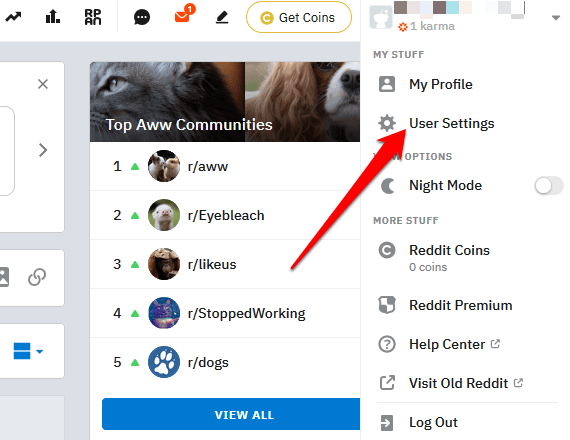
- Open Reddit on your browser, sign into the account you want to delete, and click the arrow at the upper right side next to your username. Select User Settings under My Stuff.
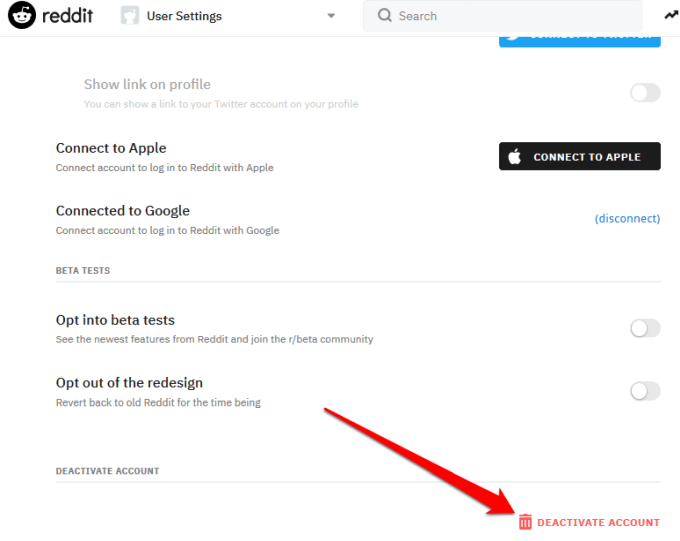
- In the User Settings page, go to the Account tab, and select Deactivate Account at the bottom of the page.
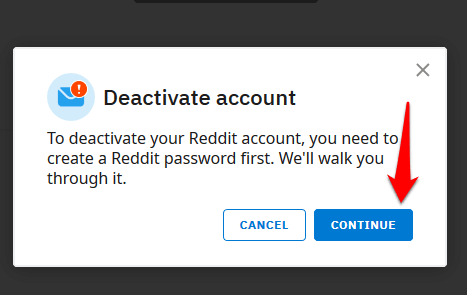
- A popup box will appear with information about deactivating your Reddit account. You may be asked to create a Reddit password first. Click Continue.
- Once you reset your password, go back to User Settings > Accounts tab and click Deactivate account. You’ll see a popup with alternatives to deleting your account and a warning about your content on the platform. There’s also a box where you can provide feedback (optional), and enter your username and password.
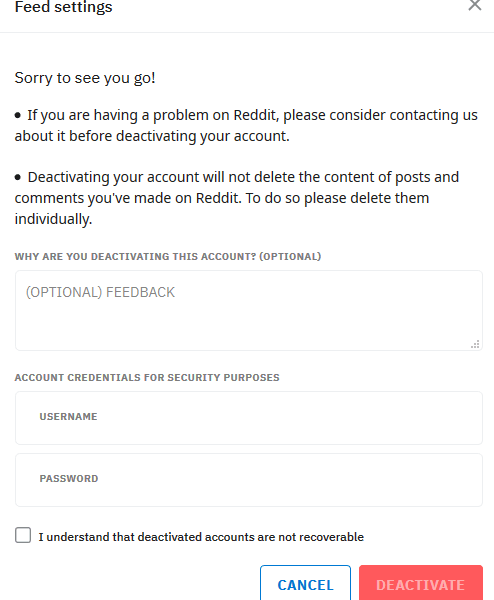
- Enter your username and password to continue with the deletion of your Reddit account. Click I understand that deactivated accounts are not recoverable.
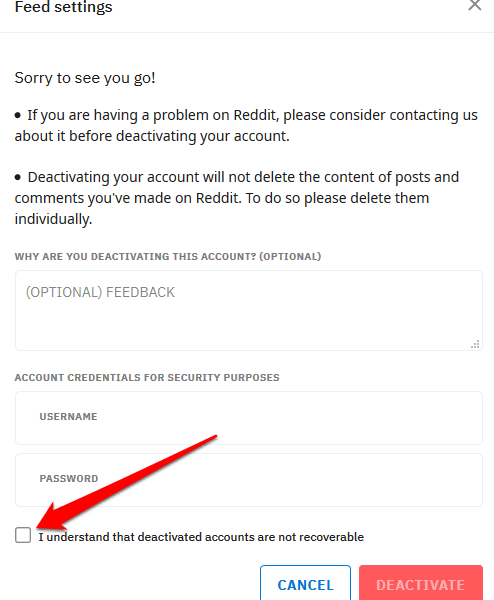
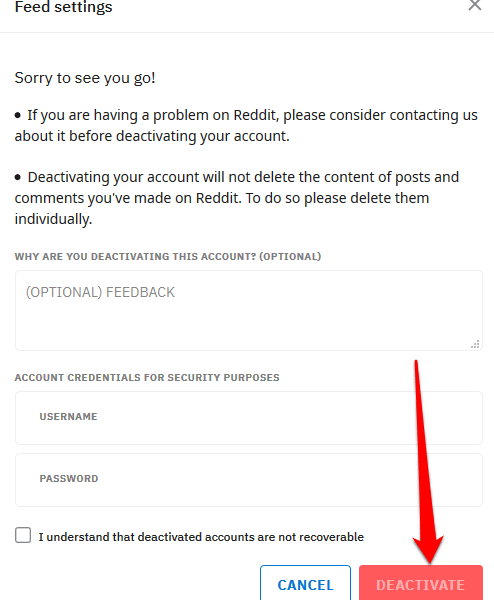
- Click Deactivate.
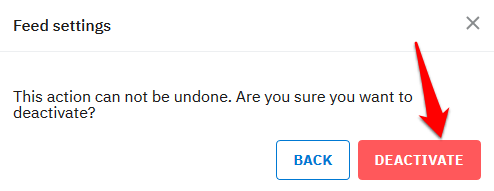
- Another popup box will appear asking you to confirm whether you really want to deactivate your Reddit account, and that your action is irreversible. If you’re sure you want to finalize the account deletion process, click Deactivate.
- The account deletion process will begin, and once it’s completed, you’ll be re-routed back to the Reddit sign-in page.
Your Reddit account is now permanently deleted. You can confirm to be sure that it has been closed by trying to sign in with your old username and password. If you see an error saying you’ve entered a wrong username or password, the deletion was successful. If not, try the steps above again.
Note: You cannot delete a Reddit account from the official Reddit mobile app. You can however open your browser on your mobile device, sign into your Reddit account, and follow the same steps to delete your account listed above.
Leave Reddit Forever
We hope this guide helped you to delete your Reddit account and leave the front page of the internet. If you struggle to delete your account on Reddit, share with us in the comments.
For more on how to delete your accounts on other social media platforms, check out our guides for deleting an account on Facebook, Gmail, Instagram, Snapchat, and YouTube.
