Rename a folder in System32 directory

I have Windows Vista installed on a virtual PC and recently I’ve not been able to install any Windows updates because I keep getting an error saying that the update failed. Taking a look at the error, it says the following:
Failed error code 8E5E03FA
Not very helpful! The event viewer does not show anything either that helps to determine what the problem is. Eventually, I found a post on some forum that helped me solve this. Apparently, one or more of the updates or patches becomes corrupt and therefore stops any update from being installed.
Table of Contents
In order to fix this and get your updates installing again, you have to rename a particular folder in your System32 directory.
Fix Error Code 8E5E03FA
Step 1: First click on Start, then Programs, then Accessories, and right-click on Command Prompt and choose Run As. Make sure to enter an Administrator account.
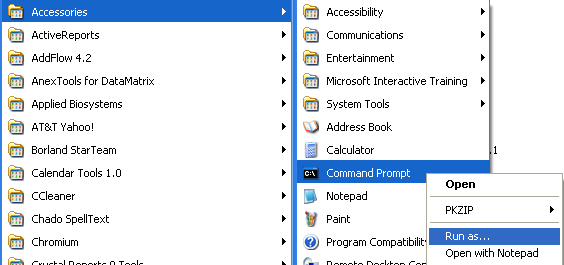
Step 2: At the command prompt, type in net stop cryptsvc and wait for the service to stop.

Step 3: Type CD\ and press Enter. Now type CD windows\system32 and hit Enter.
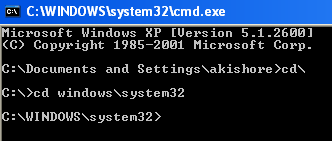
Step 4: Now type ren catroot2 catroot3 and press Enter. Catroot2 is where all the Windows certified drivers for the successful download and installation of Windows Updates are stored.
When these files get corrupted, Windows Update can fail. However, if you delete it, then Windows will re-create the folder using the protected system files, which are not corrupt, and therefore hopefully fix your problem.
So if you have not been able to install any Windows updates on Windows XP or Windows Vista, try the above method of renaming the catroot2 folder. Do not simply delete what’s inside the folder as this will not work.
Also, if you get an Access is Denied error when trying to delete catroot2, you have to make sure you are running the command prompt as an Administrator. You can also try to restart the computer in safe mode and then try to rename the folder.
Problems or questions? Post a comment and I will try to help! Enjoy!