Cryptic Windows errors are about as common as fish in the sea. I’ve previously written about many strange Windows errors, such as:
Unsupported wireless network device detected. System Halted
Instruction at referenced memory could not be read
“No more system PTEs” error (stop code 0X0000003F)
Etc, etc! In this post, I will talk about the different ways you can try to fix the following error:
Windows cannot access the specified device path or file. You may not have appropriate permissions.
What’s annoying about this message is that sometimes it has nothing to do with permissions at all! Here’s a couple of possible ways to fix it, depending on your system.
Note: First, restart your computer in Safe Mode (only XP and Vista) and see if you can open the file or programs in question. If so, it’s not a “real” permission issue, it’s a program or process on your computer that is giving the error.
Method 1 – Windows Server 2003 Terminal Services
Firstly, if you’re running into this issue on a Windows Server box running Terminal Services, your problem can be narrowed down to one or two things.
The best solution that has worked for most people is to simply uninstall Internet Explorer enhanced security configuration.
If that doesn’t work, another thing you can do is to add the server name to the list of Trusted Intranet Sites in IE.
//servername
Make sure to log off and back on in order for it to take effect. If you’re not running a server, read on.
Method 2 – Turn off anti-virus or firewall
If you are having this issue in Windows XP or Windows Vista, then your problem is probably related to an actual permission issue.
Norton Internet 200X, Bitdefender, AVG anti-virus, Trend Micro 200X can all cause this problem. If you have any of these programs installed, make sure to disable them and test it you can run programs, open files, etc.
If so, then you’ll have to either use a different program or find something on the Internet about to how to configure your software to not interact badly with Windows.
The same thing can also happen with an overly aggressive firewall. If you are running Comodo firewall or something similar (other than the basic Windows Firewall), then disable that also.
Method 3 – Unblock the file
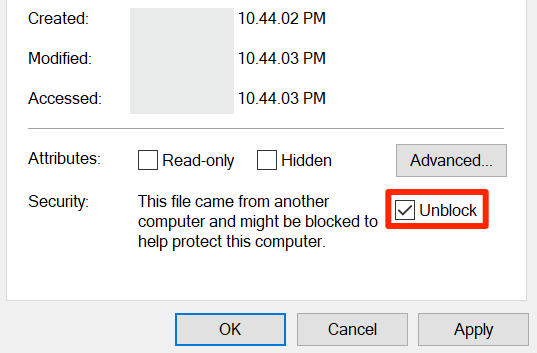
If neither of those two methods worked, the file may be blocked by Windows. Note that this is only for Windows Server 2003 and higher.
When you copy an EXE file from another computer to a Windows Server 2003 box, there is what is called a blocked property set on the file. This is due to the increased security on servers.
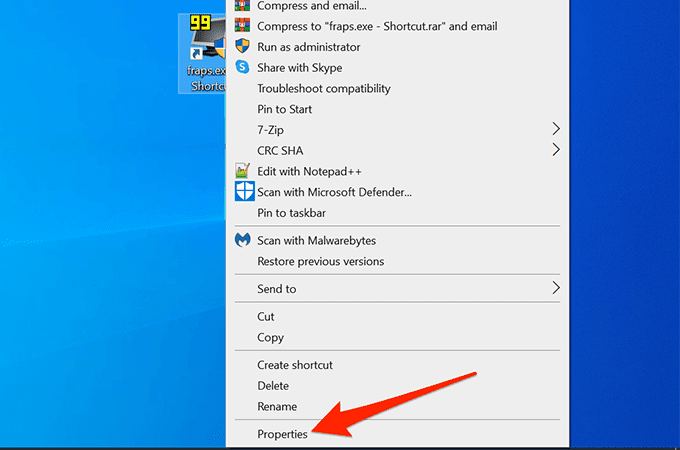
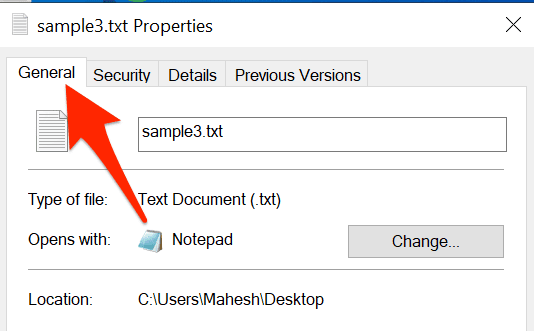
Right-click on the file and choose Properties. You’ll see a button called Unblock at the bottom.
Method 4 – Real permissions issue
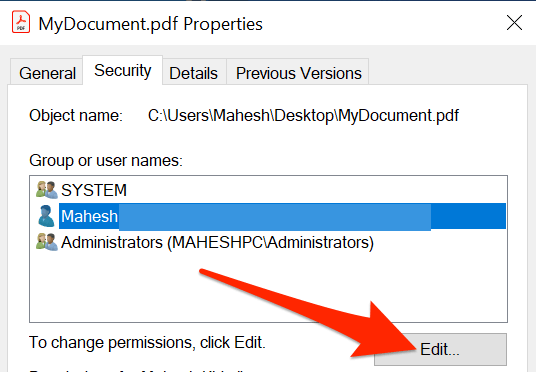
Finally, you may actually have a permissions issue. In this case, make sure you are an Administrator or you are part of the Domain Admins group if you are in a domain.
Also, you can try right-clicking on the file and choose Run As. Then type in the Administrator credentials and try to run the file. If you are able to run it, that means you account is not setup properly or is not in the right user group.
That’s about it! If you still get the “Windows cannot access the specified device path or file”, then post a comment here with details and I’ll try to help! Enjoy!


In Windows 7 Home Premium, I got this message. I went into Safe Mode and I set the password for the user. After a reboot, everything is working properly.
Under Windows 7, disable any antivirus application and re-try. It was AVG that was the problem on my machine but the error message gave no hint of that.
I get this error while trying to install Windows XP on my computer. I click OK and it finishes installing, but when it is all done, I can't open anything on the computer.
Stupid antivirus. I have sophos installed and that was causing the issue. I stopped all the services and I was able to run all the programs that were blocked.
Thanks, guys.
Help!!!
I cant turn off or turn on my firewall because of this error.
I tried:
-4 methods (above)
-run as admin
-turn off UAC
-full control (admin)
So annoying. Please help.
I am running WIN XP Pro with SP3. There are no AVG programs running or installed. NO SERVER. This just recently started happening. I am running AVAST and Microsoft Security Essentials.
Thanks for Method 1. Windows Server 2003 Terminal Services solve my problem. Thanks.
None of my icons on the desktop will open, can't open Firefox, can't execute RESTORE, can't add/delete programs, no matter what I try, it says:
"Windows cannot access the specified device, path, or file. You may not have the appropriate permissions to access the item."
I have admin access! The only icon that does work is Internet Explorer, but that doesn't load the homepage, just reloads every second to a never ending cycle of a blank page because it won't stop refreshing it!
I put AVG , Panda Security and SuperAntiSpyware on a flash drive and tried to install the 3 of them to run on the laptop to see what's up, but I get the same "Windows cannot access…." error message…. I can watch videos with VLC player from the files on my external, but that's about it. What is going on? What commands or code can I enter on start screen to restore my laptop? I can click control panel, but I can't go to user accounts to add a new admin user so that I can delete this current admin user. I get the same "Windows cannot access….." message!
Any help would be appreciated.
I don't have a solution, but a very reliable workaround. I find that it works for me when the program is launched from the command prompt.
1. Press Windows-R. Type cmd.
2. In Windows XP, drag the program .EXE to the command prompt window and press Enter in the command prompt. In Vista and higher, you need to shift-right-click the .EXE file and select "Copy as path."
3. Right-click in the command prompt window and select Paste.
4. Press Enter.
I was having the same problem on an HP Pavilion dv7 laptop with Windows Vista Home Premium and non of these worked for me. What did work was to create a new account with administrator privileges and delete the old one. You will need to move all the files and backup the email to the new account before deleting the old one, but this fixed the many problems I was having on the computer. I tried to save the old account by changing from admin to user then changing back to admin but that did not work either so I just deleted it.
Hope this helps someone else. Saw a lot of posts on this and this was not a solution anyone suggested, just something I tried.
I read thru some of the posts above, but didn't read them all. My solution to this problem was that Online Armor Firewall was blocking it, yet I didn't know it. After thinking it was a User Account issue, then an AVG Firewall issue, to no avail, I opened the interface to Online Armor and there it was telling me it had blocked me from opening the EXE file I was having the popup message with. I right clicked it and it gave me the option to allow it to run.
Methods 1-2 did not resolve the issue, however Method 3 DID. For some reason the file was "blocked" and unblocking it allowed me to install the application.
Method 3 worked for me, too. Thank you!
Oh, many thanks.
Thanks! I've had this issue on a laptop running Vista, for a while. I finally got tired of using a batch-file-from-the-command-prompt work-around and came across your article, which led me to the solution – Disable Access Protection on McAfee VirusScan Enterprise.
Thank you very much, mimimi, it worked for me. But, I have one question: Disabling the Resident Shield will not effect the AVG functions?
Thank you so much. That worked!!!
After reading and trying all these, I still can't access my photos. They are colored green (their titles).
Help!
My problem is it won't even open my desktop. It did the first 2-3 days, but now it just doesn't open and I can't seem to open it in safe mode. I press F8, but it doesn't seem to work.
I used method 4 and it turns out it is a real permission issue for me. How do I fix this? I can right click and run as admin, but is there a way to fix it?
Kaspersky Internet Security was the culprit in my case. I shut down the firewall and the problem went away. In 'threats and exclusions,' I added the problem 'exe' file as trusted and everything is back to normal.
I also stumbled upon this error on my Win XP SP3 desktop computer. All of a sudden, I couldn't run any 16-bit applications, no matter which partition it was residing on. Tried booting into Safe Mode and running them with no success. The fix was:
Access Group Policy (Start -> Run -> type "gpedit.msc"), go to Administrative TemplatesWindows ComponentsApplication CompatibilityPrevent access to 16-bit applications and set it to "disable." You have to do this even if the default is set to "Not configured." On my PC it was set to "not configured" and, despite that, it was not permitting me to execute old 16-bit apps.
Good luck!
None of this worked. I'm trying to install Open Office and I got that error. I am the administrator. It's on my C drive not on a server. I unblocked it. I took ownership. I turned off my anti-virus and my firewall. There must be one last thing I'm missing.
Please help.
jettpax@gmail.com
Thanks.
Thanks for this. This is so very helpful.
Thanks man!
Alternatively, if you have AVG, you can disable protection for a specific path by navigating to Tools -> Advanced Settings -> Exceptions (Under Resident Shield) and adding the desired path/lists there.
Works on the new AVG Free edition. (8.5)
After trying the second method, it works! I've got this AVG thing. Then, after I disabled the resident shield, the error message doesn't appear any more.
Thank you.
Great tips!
I used number 3: I didn't know that.
Very, very good.
Basically, I've tried everything here and even the suggestions themselves give me the error message. Is there any other way, or can someone tell me what's wrong?
Please help me! My whole desktop isn't allowing me to click on any programs such as iTunes, windows live messenger, internet, control panel icons and many more. The only thing I can access is an internet link which is a bit weird. From that link I can go on the internet and search things. I have hardly any icons in the Taskbar and when I right clicked on the Taskbar on the bottom right hand corner, I clicked customize notifications and all the icons that were there before said they were inactive. Every time I try and click Run As, nothing happens and I can't see the unblock button. :S
Is there anything you can do?
I tried all the above methods, but failed to try and install a .exe file. I keep getting the error. I have Windows XP SP3.
Please help me.
Windows cannot access the specified device path or file. You may not have appropriate permissions.
What a HEADACHE!!! This is my story: I just got my new laptop. It came with windows 7 (64-bit) installed. So, I had to install all the programs on it. Everything was going great until I started to get that annoying message. First, I tried playing with the security settings, and change accessibility from advanced settings, and even tried the unblocked security from file property as someone suggested. NOTHING. Same error. My problem was caused by a corrupted anti-virus software I had previously installed. My solution: Uninstall that piece of junk. Now, this computer is working like a dream.
:) Hope this helps.
If you experience this problem when you try to run a program with different privileges (Run as…), make sure you have set service 'Secondary Logon' to 'Automatic'.
Doesn't work for me. I got one virus scanner AVG. I'm trying to open ElderEdit at the file path: "C:Documents and SettingsLoungeDesktopOblivion mod savegameElderEdit."
It gives exactly the error mentioned in this topic. I have also tried the run as administrator but it says I can't have a blank password. I know for sure that I am an administrator as only user on the computer. I'm running on Windows XP and I don't have anything like Windows Server 2003 or Internet Explorer enhanced security configuration in my list of software.
Please help me.
Remon
hello im klower i haved this issue day ago but when i read what you said about anti-virus i desactivated and it was succesful thanks you so much XD
Whoever wrote this article, I love you. Problem solved by simple unblock! Thank you!
Had this issue on one W7 PC which was set up same as another that was working ok. In my instance I wanted to access a specific directory to share (on a server). Turned out that adding NETWORK in security for the folder (on server) let it through. The folder was set up as a work computer and the others wanting access were set as home so I expected some problem but not for the two homegroup ones to act so differenty – they even showed identical maps and net settings – anyhoo hope this helps someone.
Awesome..that solved my issue..thanks a ton!!! :)
if we will uninstall avg antivirus then it will work or not?
because resedient shield is not disabling….i dont know what to do…plz help
THANK YOU!!!!
MY AV (KASPERSKY) WAS THE MAIN CULPRIT!
The first comment fixed it! Never would have guessed.
I cannot use send, reply or delete button on hotmail or gmail when using firefox 9.0 but they work well when I use explorer 9. I'm using windows 7 and panda 2011. Whats wrong
For anyone using Kapersky, I was having this problem trying to run weatherbug of all things lol and foung that in the application control it was in the untrusted group, moved it to low restricted, problem solved, thanks for info, never would have looked to anti virus for perimission stuff. XD
If you can access the file before and this windows message suddenly appeared,
do a 'System Restore" and everything will be OK again.
This was my problem before and 'system restore' fixed it.
I had this problem on Windows 2003 server. I noticed that the internet explorer enhaced security configuration has been installed on this server.
I simply unblocked the file and installed it.
Okay, so I've determined it's my AVG-antivirus that's blocking my programs (even itself, ridiculously, because I had to select run as admin to open it). Will a reinstall of AVG fix this, or do I need a new antivirus program?
Windows 2003 Citrix server was giving the error but only on .bat files and only in certain folders on shared network drives??? The IE Enhanced Security Configuration fix worked perfect for me. Thanks!